Order Review
When someone buys a configured product, your Shopify order tells you they bought a catamaran. It does not tell you they picked 20 m, Midnight and a Sport helm, with the tender on deck. Order review does.
It answers two questions: what did this shopper configure, and did they pay the right amount for it.
Availability
Order review is there from the start. Permission to read your orders is part of what you approve when you install the app, alongside the access it needs to manage products, files and themes, so there is nothing extra to switch on.
If you installed 3D Bits before order review existed, the approval you gave at the time did not cover reading orders. Shopify asks you to approve the updated permissions the next time you open the app, and the section appears once you do.
The list
Orders from the last 60 days containing a configured product, newest first. The page reads your 300 newest orders in that window, so on a very busy store the oldest are not listed. For anything older, use the Shopify admin.
Each order is checked again every time you load the page, against the pricing rules it was sold under. No verdict is stored between visits. Each one shows its verdict, its total, and Shopify's fulfilment and payment status.
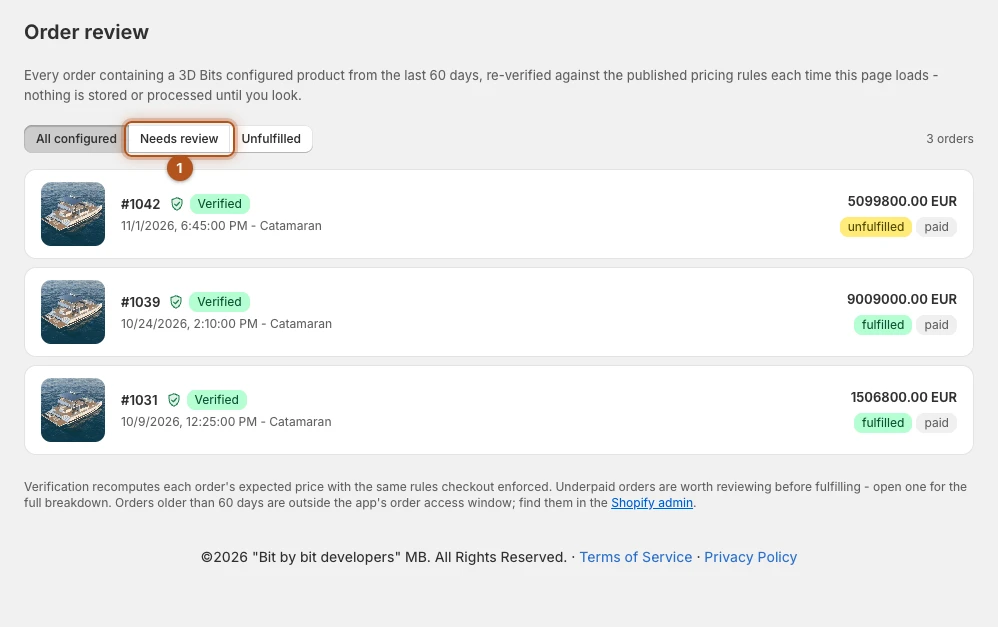
The filters narrow the list: All configured, Needs review 1 and Unfulfilled. Needs review holds every order that is neither Verified nor Paid in another currency, so an Earlier version shows there too. The review count on the app's home page leaves it out, and counts unfulfilled orders only.
Most stores see an empty needs-review filter. Look at it before you fulfil configured orders, as Going live suggests: an empty filter takes a glance.
Helper products bought on their own
The page also lists orders from the same 60 days that hold 3D Bits helper products without the configured product they belong to, each linked to the order in your Shopify admin. Cancelled, refunded and voided orders are left out, and so are orders you created yourself, from a draft order or at the point of sale.
- Orders that contain only helper products are not genuine purchases, usually someone testing stolen card numbers. Cancel and refund them rather than fulfilling them.
- Orders that include a helper product beside other goods, without its configured product, are usually a shopper who removed the configured product but kept a helper line, such as their uploaded file. Check the rest of the order, and refund the helper lines if they charged anything.
The app's home page shows how many of these orders are still unfulfilled. Checkout refuses such carts, so you should rarely see one.
An individual order
Opening an order gives you a sheet to hand to whoever makes the product: Print prints it without the app around it.
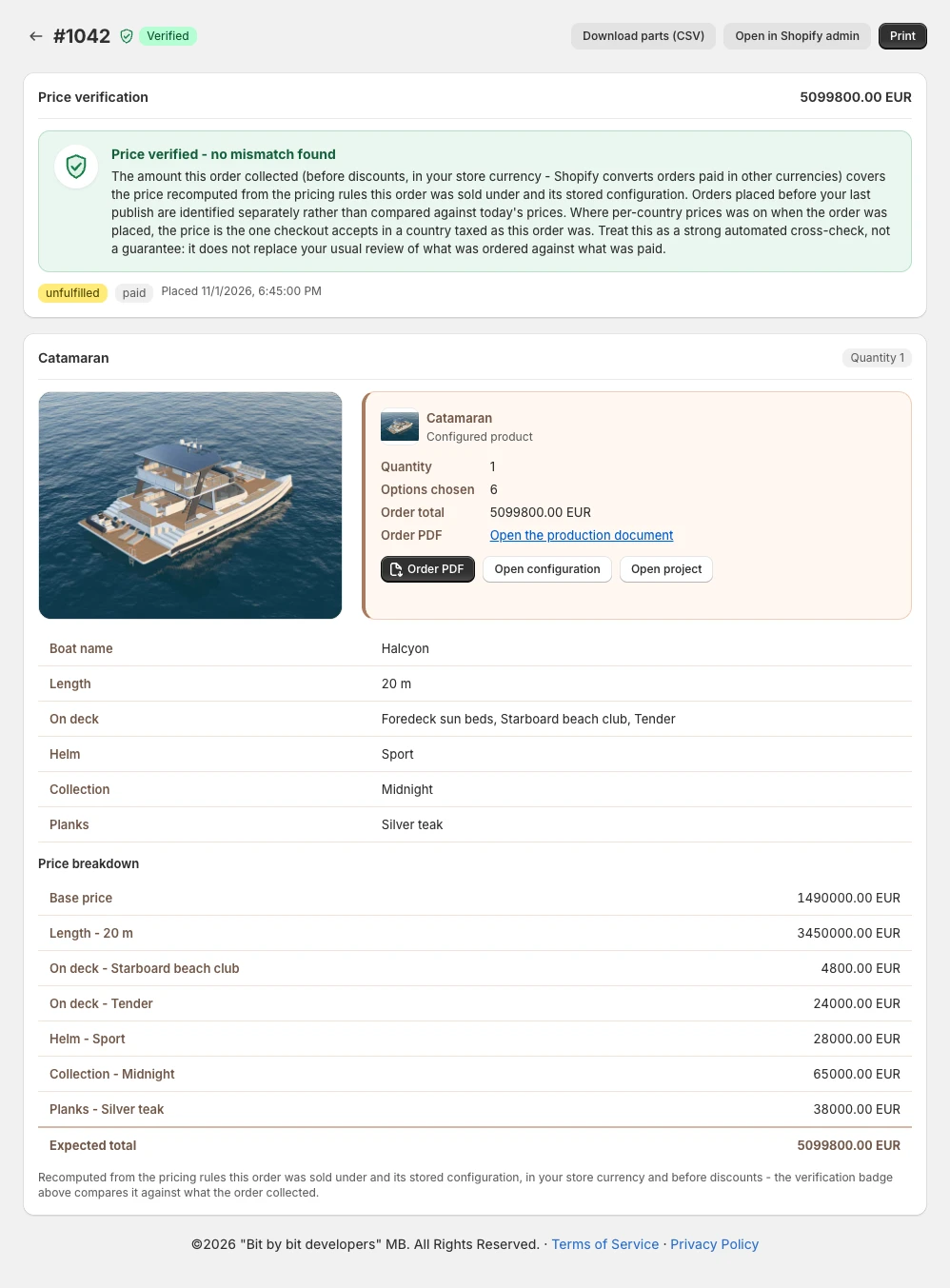
For each configured line it lists the shopper's choice on every control set to go on the order in Composer, with no prices attached. A picture the shopper uploaded shows beside its label, and any other file gets a View file link.
The picture of the configuration is there when Order snapshot is on in Composer's GUI settings. Without it the page shows the project's picture and says how to turn it on.
A separate Price breakdown table then shows the expected price, starting from the base price. Only the rows that carry money appear there, so a choice that cost nothing is in the list of choices and not in the breakdown.
Where the configuration is built from parts, the ones that carry a price appear as rows in the price breakdown. The full parts list is not shown on the page. It leaves through Download parts (CSV), which you hand to whoever cuts and assembles the thing. That file carries your internal part numbers, which the shopper-facing documents never do, and it opens in a spreadsheet.
The breakdown is read against the version of the configurator the order was sold under, not against what you have published since. When that version is no longer on file there is no breakdown, and the page says so; the same goes for a version that charged nothing at checkout, such as one published in test mode.
The choices written on an order are also read against what checkout charged for. Where the words on a line say something else, the page marks that row with the choice that was charged and shows a banner: build from the marked choice, as that is what the order paid for, whatever the picture, the order PDF or Open configuration show.
Open configuration opens the product page on the shopper's exact choices, and Open project goes to the project. If the project generates a PDF for orders, on the Pro plan, Order PDF opens it. Open in Shopify admin goes straight through to the same order for the usual fulfilment work.
What a review flag means
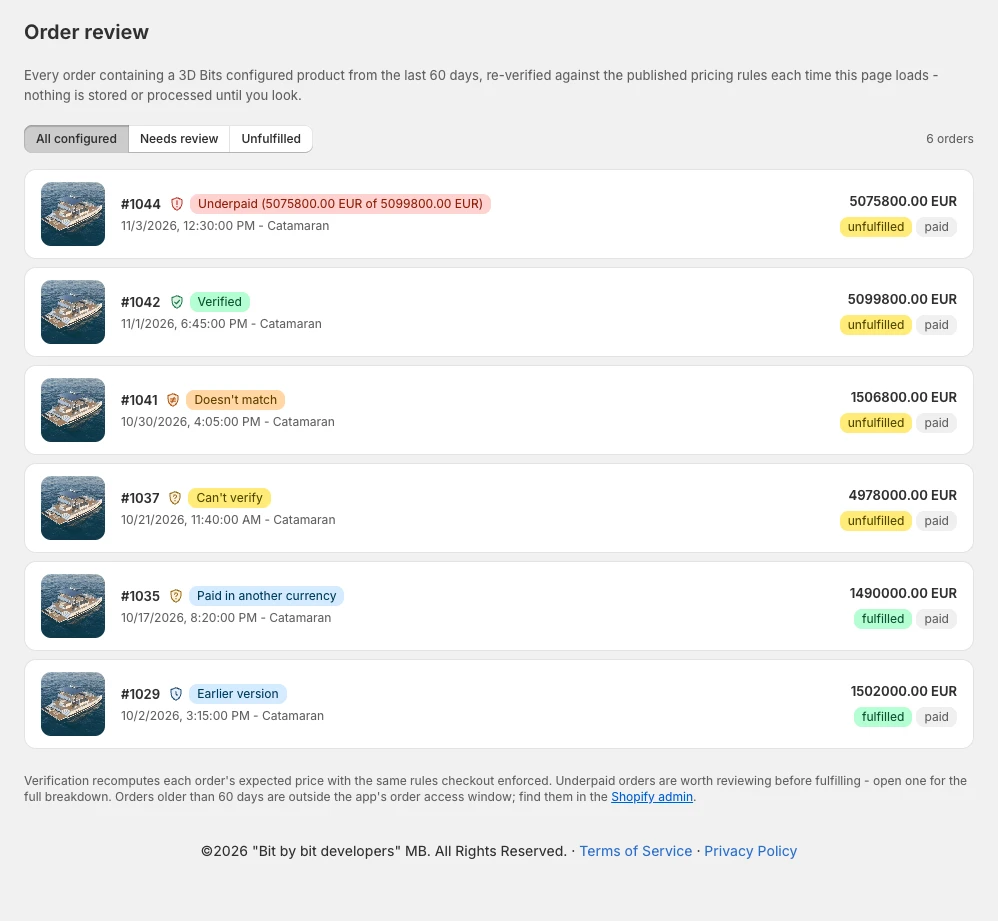
Every configured order gets one of six verdicts. An order that collected more than expected is not flagged. In a market that includes tax based on the shopper's country, the Variant matrix can charge more than the configurator showed (Other currencies explains when). Rather than refund such orders one at a time, charge through Product lines, which follows Shopify's price in every country. Until then, compare those orders with the configurator, and refund any difference in Shopify.
| Verdict | What it means | What to do |
|---|---|---|
| Verified | The order collected what its configuration should cost | Fulfil as normal |
| Earlier version | It was placed before you last published this configurator, and the pricing rules it was sold under are no longer on file, so its price could not be worked out again. Where the order carries the price quoted when it was placed, it was compared with that instead | Nothing here points at a problem, but this check is weaker than a full one. Check what was ordered against what was paid before you fulfil it |
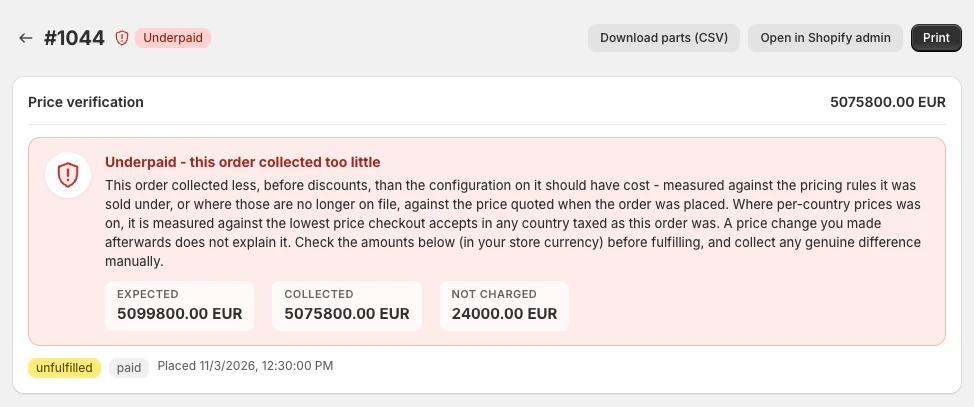
| Underpaid | It collected less, before discounts, than its configuration should have cost. The order's page gives the expected, collected and not charged amounts | Look before fulfilling, and collect any genuine difference by hand |
| Doesn't match | The order collected enough, but its products are not the ones its configuration needs. The order's page lists what differs | Check what was paid for before you fulfil it |
| Paid in another currency | The shopper paid in another currency through Shopify Markets, and its price lines could not be counted: the configurator has not been published for a while, it does not charge through Product lines, or the market rounds prices so far up that the configurator added the cart from that market's own prices. Shopify charged its amounts in the shopper's currency, so this comparison does not carry across currencies | Checkout checked the price in the shopper's currency when the order was placed. Compare what it collected with your price list before you fulfil it |
| Can't verify | The check could not be completed. The order's page says why | See below |
Paid in another currency can appear once you sell through Shopify Markets in more than one currency. It is expected, and the step is the same each time: compare what the order collected with your price list before you fulfil it. An order from a Product lines configurator you published recently usually gets an ordinary verdict instead, so publishing such a configurator again is what makes the notice stop for most of its later orders. In a market that rounds prices up far enough, its orders keep the notice.
For Can't verify, the panel on the order's page says which of these it is:
| The panel says | What to do |
|---|---|
| Can't verify - the price could not be re-checked | Compare the amount against your price list by hand. If the product is still on sale, publish it again. |
| Too many line items to total - the price could not be re-checked | The order is larger than one read can take. Compare the amount against your price list by hand. |
| Can't verify - the configuration holds a value your configurator does not offer | Your storefront never produces one, so the configuration was most likely changed by hand. Check what was ordered before you fulfil it. |
| Can't verify - checkout's record of the parts picked from your variants could not be read | Nothing points at a problem. Open the order again in a moment, or check its parts against the configuration before you fulfil it. |
| Can't verify - a variant on this order has since been deleted | The amount it collected was still checked: an order that is short shows as Underpaid instead. Only its parts could not be matched, so check them against the configuration before you fulfil it. |
| Can't verify - the key checkout records joined lines with could not be read | Nothing points at a problem. Open the order again in a moment. |
Each order is measured against the pricing rules it was sold under, including an order placed before your last publish, as long as those rules are still on file. Only when they are no longer on file does an order show as Earlier version instead.
So "I changed my prices afterwards" is not the explanation for Underpaid. Treat it as a real shortfall until you have looked.
Treat the whole thing as a strong automated cross-check rather than a guarantee: it does not replace your usual review of what was ordered against what was paid. The sheet shows you the shopper's choices and what each one contributed, which is normally enough to see what happened in a few seconds.
Why you may not need this often
Configured prices are checked at checkout, before the order exists. Order review is the record afterwards and the second check before you fulfil.
Verified against the product in November 2026