What to Expect
Putting a product on your storefront is the quick part. A configurator takes longer, and how much longer depends on your product. A chair in three fabrics is a few options on one model. A boat in several lengths, with finishes, extras that only fit some sizes and a price that follows every choice, is a project. If your product is the second kind, plan for that.
Where the effort goes
Two things take the time: the 3D model, and the configurator you build on it.
The model
What your shopper sees is the file you upload. Three things matter.
Size. Your shopper downloads this model, often on a phone. Composer warns you from 20 MB per model, and on iPhone Safari the product page leaves out any single model over 30 MB rather than risk crashing the page. Size and performance has the limits. The catamaran's 20 m boat is 7.1 MB, so getting there is a normal part of preparing 3D for the web rather than a compromise.
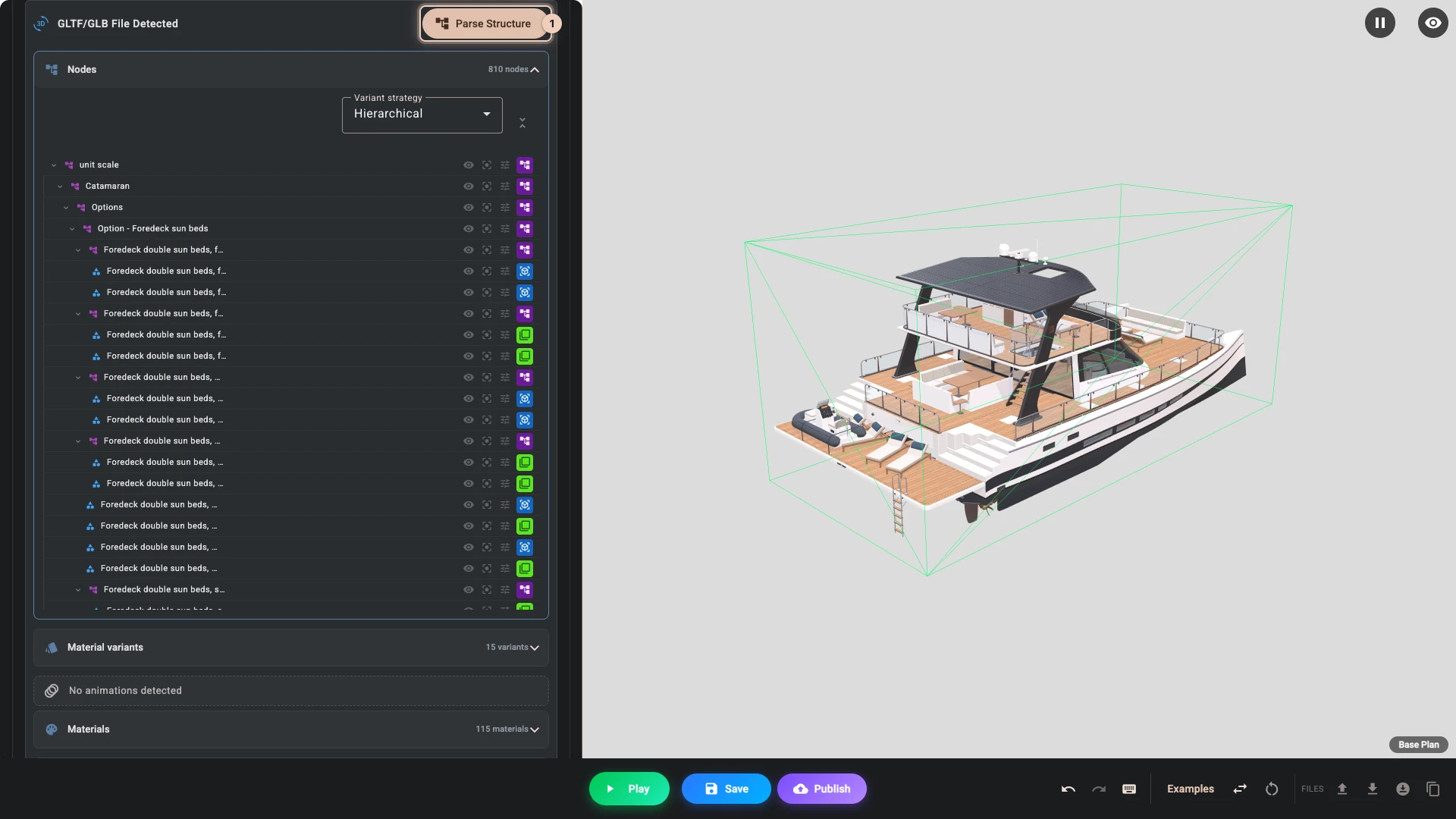
Separated objects. If a shopper chooses the helm separately from the hull, the helm needs to be its own object in the file. A model exported as one merged lump looks fine but cannot be configured, and nothing in the app fixes that. Parse structure 1 in Composer lists what a file holds, so check it before you build anything else.
Honest materials. The colours and finishes in the model are what your shopper will judge. Getting teak to look like teak is worth the effort.
Our 3D Assets guides cover all of this, including how to get a model out of CAD and ready for the web.
The configurator
Composer gives you the pieces: options, the rules between them, the panel, prices, linked products and parts. Putting them together for your product is real work, and for a complex product it is most of the work.
Every option has to change the right parts of the model. Options that depend on each other need rules: a choice that only fits some sizes, a section that only shows when it applies. The panel has to stay clear with dozens of choices, on a phone as well as on a desktop. And the price has to come out right for every combination a shopper can reach, so you will spend time trying them, because the configurator only knows the rules you give it.
Build the Catamaran Configurator shows what that takes for one complex product, in nine chapters.
If you do not have a model
Plenty of merchants do not, and there are three normal routes.
If your product exists as CAD, from your manufacturing or from your designer, we have a converter built into the app for STEP files.
If your product is physical and you can put it in front of a phone, 3D scanning has become genuinely good. Gaussian Splat scans are supported directly and can look remarkable for products with complicated surfaces.
Or you can have a model made. We do this as a paid service, and we are happy to quote. If you tell us what you make, we will tell you honestly what would be involved.
What you will need to understand
No code, but your own product, in detail.
You will want to know how to get around your Shopify admin, and how to upload a file. If you are letting Shopify variants drive the model, it helps to have your variants organised sensibly first, since the configurator follows them.
The harder part is writing your product down as rules: which options exist, which combinations are allowed and what each one costs. A configurator can only be as clear as those rules, so settle them before you build. If they live in someone's head, or in a price list full of exceptions, getting them onto paper is the first job.
You do not need to understand code, theme development, metafields, or how any of the 3D machinery works. Those exist for people who want them and stay out of the way otherwise.
A sensible order to work in
Get one product live before you plan the catalogue. Take your simplest product, or even a single option on a complicated one, and take it all the way through to a real product page. You will learn more from that than from reading, and you will find out early whether your model is separated the way you need.
Once one works, you will have a realistic idea of what the rest involves.
When to ask us
Sooner than you think. Most of the problems merchants write to us about after a week of struggling would have taken us five minutes at the start, and usually they trace back to how the model was exported.
Write to info@bitbybit.dev. Tell us what you make and send the model if you have one. We will look at it properly.
When you are ready to start, Your First Configurator takes one product to a live page.
Verified against the product in November 2026