Editor settings
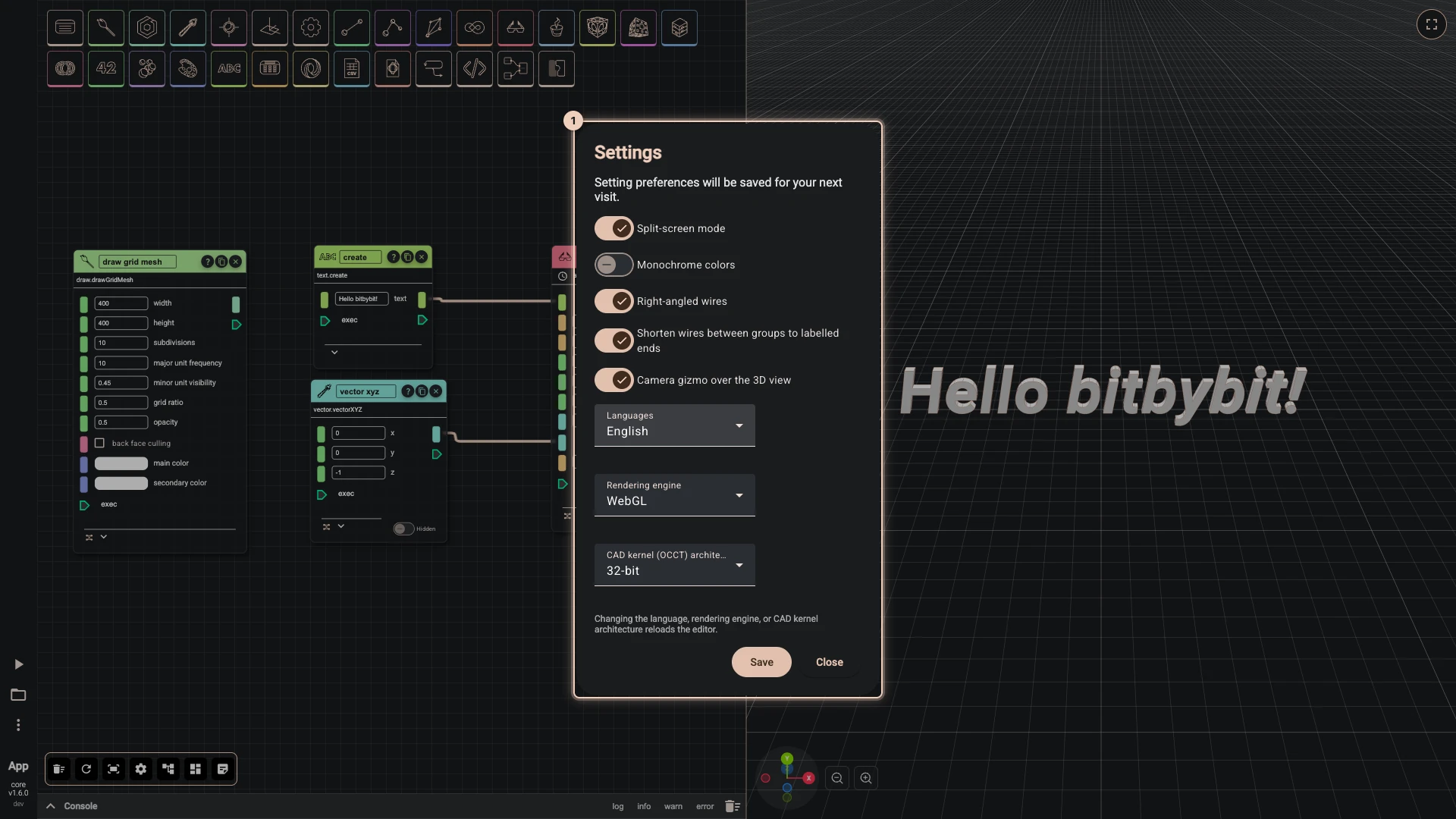
Rete, Blockly and the TypeScript editor share one set of settings: open More > Settings in any of them. They are kept in this browser, so they follow you from script to script but not to another computer. The General tab holds the editor's own settings, the Rendering tab the look of what scripts draw.
| Setting | What it changes |
|---|---|
| Split-screen mode | On, the editor and the 3D view sit side by side, with a divider to drag. Off, each takes the whole window and Swap canvas (F4) switches between them. A phone always works one at a time. |
| Monochrome colors | Draws Rete's sockets and wires in one colour instead of a colour per type, for a calmer canvas. |
| Right-angled wires | Draws Rete's wires as horizontal and vertical runs with rounded corners, each output of a node turning in a lane of its own, so wires side by side never overlap. Off, wires are curves. On by default. |
| Shorten wires between groups to labelled ends | A wire from one group to another is drawn as two short ends, each labelled with what is at the other end. Point at a label, or select either node, to see the whole wire. On by default. |
| Camera gizmo over the 3D view | Shows the axes widget and zoom buttons in the corner of the 3D view; click an axis to look along it. |
| Language | The language of the editors' menus, components and blocks: English, Lietuvių, Latviešu, Eesti, Svenska, 简体中文, Español, हिन्दी, Français, Polski, Suomi, العربية, বাংলা, Português, Українська, Bahasa Indonesia, Deutsch or Русский. These docs are in English. |
| Rendering engine | WebGL works in every browser; WebGPU is newer and faster where the browser supports it. |
| CAD kernel (OCCT) architecture | 32-bit is the default, smaller to download and right for almost every script; it can use up to 2 GB of memory. 64-bit can use up to 16 GB, for very large models and big STEP files, and takes longer to load. |
The five switches apply as you flip them, and Save keeps them; Cancel, Escape or a click outside the settings puts back every setting as it was when you opened them, the look on the Rendering tab included. The language, the rendering engine and the kernel architecture apply when you press Save: the editor reloads to change them, and asks first, so save your script before you confirm with Reload.
Rendering
The Rendering tab sets the look of everything a script draws without draw options of its own, and the light of each new scene. The script still decides when it says something: options passed to a draw call replace these settings for what that call draws, all but metallic and roughness, which options do not have, and a skybox the script turns on replaces the one set here.
| Setting | What it changes |
|---|---|
| Preset | Fresh, the default: white faces with a slight sheen that shows how they bend, no back faces, grey edges that scale with the model and white wires, meshing that follows the model's size, and a hidden studio environment with neutral tone mapping. Classic: the look of earlier versions, red metallic faces with white edges, blue back faces and no environment. Changing anything below makes it Custom. |
| Face color, Metallic, Roughness | The color of faces drawn without options, and how metallic and how rough every face drawn from a color is, from 0 to 1. |
| Draw back faces, Back face color | Whether the inside of a face is drawn, and in which color. Off in the Fresh preset, so an open surface shows nothing from behind; turn it on, or pass drawTwoSided in the script's options, to see both sides. |
| Edge color, Wire color, Edge width | The color of the edges of shapes drawn with faces; the color of wires, of shapes drawn without faces and of lines, polylines and curves, white in the Fresh preset so they stand out against the dark background; and the width of the edges and wires of shapes. |
| Scale edges with the size of the model | Edges keep their width on a shape 10 units across from corner to corner of its box, and grow or shrink in proportion on larger and smaller ones, so they look alike on a screw and on a building. Design builds keep the width as set. |
| Precision, Share of model size | How closely triangles follow curved faces: within the precision, or within that share of a shape's size when the shape is large enough for it to be coarser. |
| Skybox, Show the skybox, Environment intensity | The environment that lights the scene and that metal reflects: the photographed Studio, Partly cloudy, Sunset, Clear day, Fair weather, Overcast, Morning, Dusk and Night, or the built-in Default, Clear sky, City and Grey gradient, hidden unless shown. |
| Tone mapping, Exposure | How the light is fitted to the screen. Neutral keeps whites white without flattening them into a silhouette. |
When you save the settings after changing the look, a script that has drawn something runs again to show it, and in Rete every component is computed again; with nothing drawn yet, only the scene changes. The Designer keeps its own look.
Verified against the product in October 2026