
Importing SVG Drawings
SVG is the easiest way to get a 2D outline out of a drawing tool and into a script. You draw in Illustrator, Inkscape, Figma or a browser, save an SVG, and import it as OCCT wires or faces.
The importer does not support the whole SVG specification, and this page tells you where the edges are, so you can prepare a file that imports cleanly the first time.
A drawing into a plate
bitbybit.occt.svg.loadSVG takes the text of an SVG document and gives one compound of everything it draws, laid on the ground. faceStrategy decides what closed outlines become: none keeps them as wires, and the other strategies make faces, with the holes worked out as described under Faces and holes. A face extrudes into a solid.
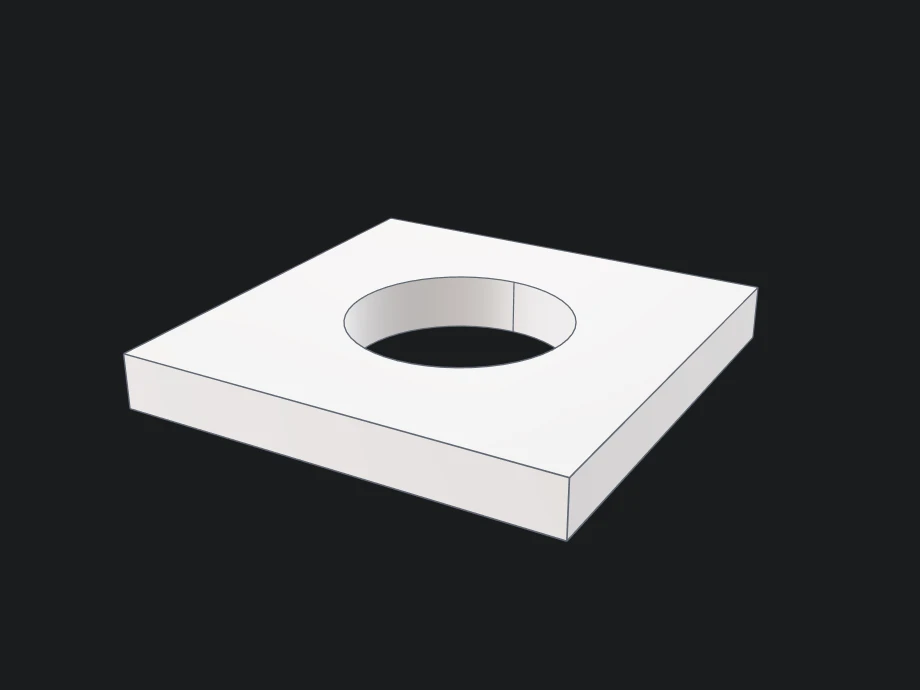
Here a path draws a square and a circle inside it. With the evenOdd strategy the circle becomes a hole, and the face is extruded upward into a plate:
- Rete
- Blockly
- TypeScript


{
  "id": "rete-v2-json",
  "nodes": {
    "drawing": {
      "id": "drawing",
      "name": "bitbybit.occt.svg.loadSVG",
      "customName": "load SVG",
      "async": true,
      "drawable": true,
      "data": {
        "genericNodeData": {
          "hide": true,
          "oneOnOne": false,
          "flatten": 0,
          "forceExecution": false
        },
        "svg": "<svg xmlns=\"http://www.w3.org/2000/svg\" viewBox=\"0 0 20 20\"><path d=\"M2,2 L18,2 L18,18 L2,18 Z M10,6 A4,4 0 1,0 10,14 A4,4 0 1,0 10,6 Z\"/></svg>",
        "faceStrategy": "evenOdd",
        "makeRibbons": false,
        "includeInvisible": false,
        "joinSegments": true,
        "tolerance": 1e-7,
        "scale": 1,
        "flipY": true,
        "alignment": "midMid",
        "direction": [
          0,
          1,
          0
        ],
        "center": [
          0,
          0,
          0
        ],
        "keepOrigin": false
      },
      "inputs": {},
      "position": [
        40,
        40
      ]
    },
    "plate": {
      "id": "plate",
      "name": "bitbybit.occt.operations.extrude",
      "customName": "extrude",
      "async": true,
      "drawable": true,
      "data": {
        "genericNodeData": {
          "hide": false,
          "oneOnOne": false,
          "flatten": 0,
          "forceExecution": false
        },
        "direction": [
          0,
          2,
          0
        ]
      },
      "inputs": {
        "shape": {
          "connections": [
            {
              "node": "drawing",
              "output": "result",
              "data": {}
            }
          ]
        }
      },
      "position": [
        460,
        40
      ]
    },
    "view": {
      "id": "view",
      "name": "bitbybit.babylon.scene.adjustActiveArcRotateCamera",
      "customName": "adjust active arc rotate camera",
      "async": false,
      "drawable": false,
      "data": {
        "genericNodeData": {
          "hide": false,
          "oneOnOne": false,
          "flatten": 0,
          "forceExecution": false
        },
        "position": [
          12,
          26,
          -22
        ],
        "lookAt": [
          0,
          1,
          0
        ],
        "lowerBetaLimit": 1,
        "upperBetaLimit": 179,
        "angularSensibilityX": 1000,
        "angularSensibilityY": 1000,
        "maxZ": 1000,
        "panningSensibility": 1000,
        "wheelPrecision": 3
      },
      "inputs": {},
      "position": [
        880,
        40
      ]
    }
  },
  "modules": {}
}

<xml xmlns="https://developers.google.com/blockly/xml"><block type="bitbybit.draw.drawAnyAsyncNoReturn" x="40" y="40"><value name="Entity"><block type="bitbybit.occt.operations.extrude"><value name="Shape"><block type="bitbybit.occt.svg.loadSVG"><value name="Svg"><block type="text"><field name="TEXT"><svg xmlns="http://www.w3.org/2000/svg" viewBox="0 0 20 20"><path d="M2,2 L18,2 L18,18 L2,18 Z M10,6 A4,4 0 1,0 10,14 A4,4 0 1,0 10,6 Z"/></svg></field></block></value><value name="FaceStrategy"><block type="bitbybit.occt.enums.svgFaceStrategyEnum"><field name="bitbybit.occt.enums.svgFaceStrategyEnum">'evenOdd'</field></block></value><value name="MakeRibbons"><block type="logic_boolean"><field name="BOOL">FALSE</field></block></value><value name="IncludeInvisible"><block type="logic_boolean"><field name="BOOL">FALSE</field></block></value><value name="JoinSegments"><block type="logic_boolean"><field name="BOOL">TRUE</field></block></value><value name="Tolerance"><block type="math_number"><field name="NUM">1e-7</field></block></value><value name="Scale"><block type="math_number"><field name="NUM">1</field></block></value><value name="FlipY"><block type="logic_boolean"><field name="BOOL">TRUE</field></block></value><value name="Alignment"><block type="bitbybit.base.enums.basicAlignmentEnum"><field name="bitbybit.base.enums.basicAlignmentEnum">'midMid'</field></block></value><value name="Direction"><block type="bitbybit.vector.vectorXYZ"><value name="X"><block type="math_number"><field name="NUM">0</field></block></value><value name="Y"><block type="math_number"><field name="NUM">1</field></block></value><value name="Z"><block type="math_number"><field name="NUM">0</field></block></value></block></value><value name="Center"><block type="bitbybit.point.pointXYZ"><value name="X"><block type="math_number"><field name="NUM">0</field></block></value><value name="Y"><block type="math_number"><field name="NUM">0</field></block></value><value name="Z"><block type="math_number"><field name="NUM">0</field></block></value></block></value><value name="KeepOrigin"><block type="logic_boolean"><field name="BOOL">FALSE</field></block></value></block></value><value name="Direction"><block type="bitbybit.vector.vectorXYZ"><value name="X"><block type="math_number"><field name="NUM">0</field></block></value><value name="Y"><block type="math_number"><field name="NUM">2</field></block></value><value name="Z"><block type="math_number"><field name="NUM">0</field></block></value></block></value></block></value><next><block type="bitbybit.babylon.scene.adjustActiveArcRotateCamera"><value name="Position"><block type="bitbybit.point.pointXYZ"><value name="X"><block type="math_number"><field name="NUM">12</field></block></value><value name="Y"><block type="math_number"><field name="NUM">26</field></block></value><value name="Z"><block type="math_number"><field name="NUM">-22</field></block></value></block></value><value name="LookAt"><block type="bitbybit.point.pointXYZ"><value name="X"><block type="math_number"><field name="NUM">0</field></block></value><value name="Y"><block type="math_number"><field name="NUM">1</field></block></value><value name="Z"><block type="math_number"><field name="NUM">0</field></block></value></block></value><value name="LowerBetaLimit"><block type="math_number"><field name="NUM">1</field></block></value><value name="UpperBetaLimit"><block type="math_number"><field name="NUM">179</field></block></value><value name="AngularSensibilityX"><block type="math_number"><field name="NUM">1000</field></block></value><value name="AngularSensibilityY"><block type="math_number"><field name="NUM">1000</field></block></value><value name="MaxZ"><block type="math_number"><field name="NUM">1000</field></block></value><value name="PanningSensibility"><block type="math_number"><field name="NUM">1000</field></block></value><value name="WheelPrecision"><block type="math_number"><field name="NUM">3</field></block></value></block></next></block></xml>

const svg = '<svg xmlns="http://www.w3.org/2000/svg" viewBox="0 0 20 20"><path d="M2,2 L18,2 L18,18 L2,18 Z M10,6 A4,4 0 1,0 10,14 A4,4 0 1,0 10,6 Z"/></svg>';
const drawing = await bitbybit.occt.svg.loadSVG({ svg, faceStrategy: Bit.Inputs.OCCT.svgFaceStrategyEnum.evenOdd });
const plate = await bitbybit.occt.operations.extrude({ shape: drawing, direction: [0, 2, 0] });

await bitbybit.draw.drawAnyAsync({ entity: plate });
bitbybit.babylon.scene.adjustActiveArcRotateCamera({ position: [12, 26, -22], lookAt: [0, 1, 0] });
scale maps the drawing's units to the model's, flipY turns SVG's downward Y axis up, and alignment, direction and center place the result. loadSVGStructured gives one shape per element instead, each with its fill and stroke, for colouring the parts or keeping only some.
In a project, keep the drawing as a file and read it with bitbybit.asset.getTextFile (Assets).
What gets imported
Seven elements produce geometry:
path, rect, circle, ellipse, line, polyline, polygon
Nine more are recognised and deliberately skipped, because they hold definitions rather than drawings:
defs, symbol, clipPath, mask, marker, pattern, metadata, title, desc
Grouping elements such as g, a and switch are walked through, so geometry nested inside them
comes across normally along with any transform they apply.
The import tells you what it could not use
The result carries a warnings array. Anything the importer met and could not turn into geometry is
reported there, once per kind of element. A very large file is read up to the size the importer
builds from a file of its length, and the rest is named there too; loadSVG returns only the
shapes, so read such a file with loadSVGStructured to see what was left out.
Read it. An SVG that imports as an empty scene is almost always explained by a single line in that array, and the alternative is guessing.
What to know before you export
Reused symbols come across
The use element places a copy of something defined elsewhere in the document, usually inside defs
or a symbol. The importer follows it: the copy lands under the use element's own transform and
offset, takes on its style, and a symbol is fitted into the size the use gives it. This is how most
drawing tools export anything repeated, so a shape defined once and placed twenty times imports as
twenty shapes.
A use that points back at an element containing it, which would repeat forever, is refused with a
warning, and so is one that points at another file. A document built to expand without end stops at
half a million elements, or at as many path segments as a file of its size may hold: two for each
character of the file, never fewer than 25,000 and never more than 120,000. Either way it says so in
its warnings.
Text is not geometry
text and tspan describe characters in a font, not outlines. Fonts are not available to the
importer, so text cannot be turned into shapes.
What to do: convert text to paths or outlines before exporting. Every major drawing tool has this option, usually called "Convert to Outlines", "Object to Path" or "Create Outlines".
The same applies to image, which holds a raster picture, and foreignObject, which holds content
that is not SVG at all. Neither has geometry to import.
Styling
Presentation attributes and inline style="..." are both read, and inherited down the tree the way you
would expect.
Embedded <style> blocks are applied too, with the usual CSS precedence: the stylesheet over
presentation attributes, an inline style over the stylesheet, and !important over both. Selectors
by element, #id, .class and attribute, grouped with commas and combined by descendant and child,
are matched, and rules inside @media apply. A selector the importer cannot match, such as a
pseudo-class or a sibling combinator, is named in one warning rather than dropped silently. A
transform given in CSS, clip-path and mask are not applied, and are warned about.
A transform attribute the importer cannot read in full is ignored as a whole, as a browser ignores
it, with a warning, so a drawing never lands half-transformed.
Faces and holes
If you ask for faces rather than wires, the importer decides which outlines are holes inside other outlines, and which are separate shapes.
Two things decide it: whether a point inside one outline lies inside another, and whether its area is genuinely smaller. Both are needed. The area comparison is what separates two circles drawn around the same centre, where the point test alone cannot tell you which contains which.
Your drawing's own fill rule is respected, so a shape drawn with evenodd and one drawn with
nonzero produce the hole arrangement you see in the drawing tool. Two outlines lying exactly on one
another and wound opposite ways leave nothing filled where the fill rule says they cancel, rather than
two faces on top of each other.
A filled element with more than 100,000 pairs of outlines whose bounding boxes overlap, such as thousands of concentric rings in one path, comes back as its outlines with a warning: sorting out its holes would take too long.
Arcs survive transforms
An arc inside a group that has been scaled, rotated or mirrored stays a true arc rather than being approximated. Mirroring reverses the direction the arc sweeps, which is handled, so a mirrored drawing does not come in with its curves bulging the wrong way.
Paths without a file
The importer turns every element into the vocabulary of SVG paths, lines, quadratic and cubic curves and arcs, and builds it with bitbybit.occt.path.shapeFromPath. You can call it yourself with subpaths you compute: one wire per subpath, or faces when makeFaces is on and the outlines close. It is the shortest way to an outline made of arcs and curves without writing an SVG document.
Every function
SVG
| Function | What it does |
|---|---|
loadSVG | Parses an SVG document into one compound on the ground, ready to draw, extrude or transform. |
loadSVGStructured | Parses an SVG document and builds one shape per drawable element, each bundled with its resolved fill, stroke and stroke width, plus the warnings, the view box and the page size in millimetres. |
Paths
| Function | What it does |
|---|---|
shapeFromPath | Builds a shape from path subpaths: one wire per subpath, packed into a compound when there are several, or a face when makeFaces is true and the outlines close. |