
Importing STEP and IGES
STEP and IGES are the two exchange formats CAD systems agree on. Both describe exact geometry rather than a mesh, so what you get back is a real solid you can cut, fillet and measure, not a triangulated approximation.
Four extensions, two shapes of data
| Extension | Format | Data |
|---|---|---|
.step, .stp | STEP | text |
.iges, .igs | IGES | text |
.stpz | STEP | compressed, binary |
.igz | IGES | compressed, binary |
The compressed variants are ordinary STEP and IGES run through zip. They are common when a file is emailed or downloaded, because the text forms are large.
Compressed files must be handed over as binary. Read the file as an ArrayBuffer or a
Uint8Array rather than as text. Reading a compressed file as text corrupts it before the importer
ever sees it, because the bytes are not valid text.
Uncompressed STEP and IGES can be passed as text, which is usually the simpler path.
Passing a file from a browser
If you have a File from an upload input, or a Blob, read it before you pass it in:
await file.text()for uncompressed STEP or IGESawait file.arrayBuffer()for the compressed.stpzand.igzforms, or when you would rather not think about which you have
Handing a File or Blob straight to the importer does not work. Reading one is asynchronous, and the
importer is not, so the conversion has to happen on your side first.
Standing the model up
CAD systems commonly treat Z as up, while Bitbybit treats Y as up. A model imported from such a system therefore arrives lying on its side.
The adjustZtoY option corrects that as part of the import. Turn it on for a file that came out of a
CAD package, and leave it off for one that was written by Bitbybit.
Lengths arrive in your unit
A STEP or IGES file states the unit its lengths are in, and programs differ: millimetres are the most
common, inches the next. bitbybit.occt.io.loadSTEPorIGES and loadSTEPorIGESFromText scale whatever
the file holds into the unit you ask for, millimetres by default, so a part drawn in inches arrives
at its true size in a model built in millimetres. Choose inches as the unit to work in inches
instead; the choices are millimetres, centimetres, metres and inches.
To know what a file is written in before you build anything, bitbybit.occt.io.fileLengthUnit reads
its unit without building its geometry. It takes the file's text or its bytes, the compressed forms
included, and a fileName whose extension says whether it is STEP or IGES. It tells millimetres,
centimetres, metres and inches apart, and gives undefined for a file in another unit, one whose
parts disagree, or one that states none.
Writing a shape back out works the other way round: unit says what the shape's numbers are, and the file is always written in millimetres (Getting a model out).
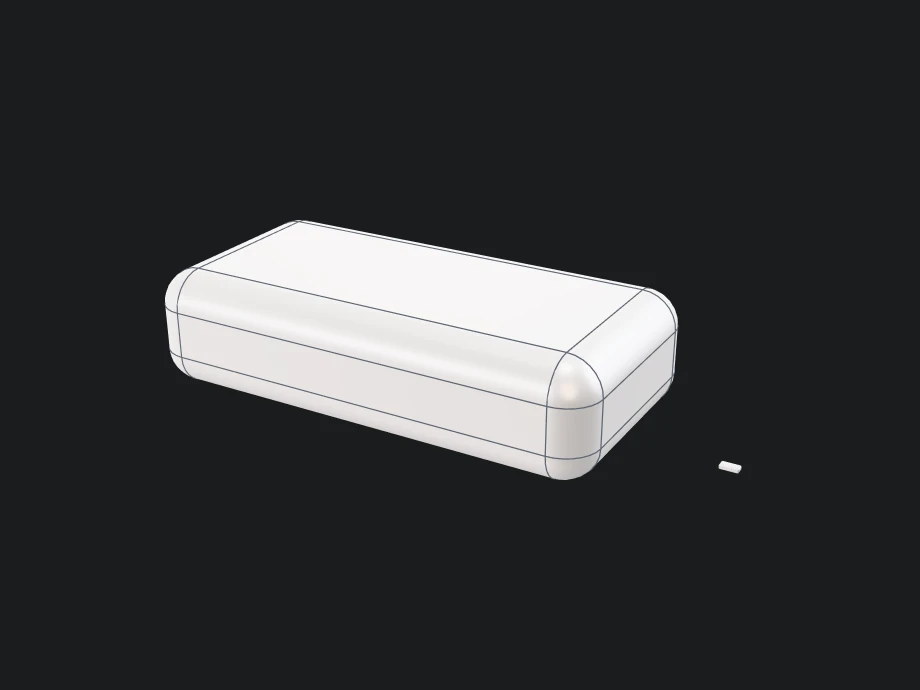
This example needs no file of your own: it writes one with bitbybit.occt.io.saveShapeSTEPAndReturn and reads the text back. The part is modelled in inches, four long, and unit says so. The file is written in millimetres, which is what fileLengthUnit reports. Read in that unit, the part comes back 101.6 long. Read in inches, it comes back at four, shown small beside it. adjustYtoZ on the way out and adjustZtoY on the way in stand it back up:
- Rete
- Blockly
- TypeScript


{
  "id": "rete-v2-json",
  "nodes": {
    "box": {
      "id": "box",
      "name": "bitbybit.occt.shapes.solid.createBox",
      "customName": "box",
      "async": true,
      "drawable": true,
      "data": {
        "genericNodeData": {
          "hide": true,
          "oneOnOne": false,
          "flatten": 0,
          "forceExecution": false
        },
        "width": 4,
        "length": 2,
        "height": 1,
        "center": [
          0,
          0.5,
          0
        ],
        "originOnCenter": true
      },
      "inputs": {},
      "position": [
        40,
        40
      ]
    },
    "part": {
      "id": "part",
      "name": "bitbybit.occt.fillets.filletEdges",
      "customName": "fillet edges",
      "async": true,
      "drawable": true,
      "data": {
        "genericNodeData": {
          "hide": true,
          "oneOnOne": false,
          "flatten": 0,
          "forceExecution": false
        },
        "radius": 0.3
      },
      "inputs": {
        "shape": {
          "connections": [
            {
              "node": "box",
              "output": "result",
              "data": {}
            }
          ]
        }
      },
      "position": [
        460,
        40
      ]
    },
    "file": {
      "id": "file",
      "name": "bitbybit.occt.io.saveShapeSTEPAndReturn",
      "customName": "save shape step and return",
      "async": true,
      "drawable": false,
      "data": {
        "genericNodeData": {
          "hide": false,
          "oneOnOne": false,
          "flatten": 0,
          "forceExecution": false
        },
        "fileName": "part.step",
        "adjustYtoZ": true,
        "fromRightHanded": false,
        "tryDownload": false,
        "unit": "in"
      },
      "inputs": {
        "shape": {
          "connections": [
            {
              "node": "part",
              "output": "result",
              "data": {}
            }
          ]
        }
      },
      "position": [
        880,
        40
      ]
    },
    "fileUnit": {
      "id": "fileUnit",
      "name": "bitbybit.occt.io.fileLengthUnit",
      "customName": "file length unit",
      "async": true,
      "drawable": false,
      "data": {
        "genericNodeData": {
          "hide": false,
          "oneOnOne": false,
          "flatten": 0,
          "forceExecution": false
        },
        "fileName": "part.step"
      },
      "inputs": {
        "filetext": {
          "connections": [
            {
              "node": "file",
              "output": "result",
              "data": {}
            }
          ]
        }
      },
      "position": [
        1300,
        40
      ]
    },
    "readInFileUnit": {
      "id": "readInFileUnit",
      "name": "bitbybit.occt.io.loadSTEPorIGESFromText",
      "customName": "load step or iges from text",
      "async": true,
      "drawable": false,
      "data": {
        "genericNodeData": {
          "hide": false,
          "oneOnOne": false,
          "flatten": 0,
          "forceExecution": false
        },
        "text": "",
        "fileType": "step",
        "adjustZtoY": true,
        "unit": "mm"
      },
      "inputs": {
        "text": {
          "connections": [
            {
              "node": "file",
              "output": "result",
              "data": {}
            }
          ]
        },
        "unit": {
          "connections": [
            {
              "node": "fileUnit",
              "output": "result",
              "data": {}
            }
          ]
        }
      },
      "position": [
        1720,
        40
      ]
    },
    "drawLarge": {
      "id": "drawLarge",
      "name": "bitbybit.draw.drawAnyAsync",
      "customName": "draw any async",
      "async": true,
      "drawable": true,
      "data": {
        "genericNodeData": {
          "hide": false,
          "oneOnOne": false,
          "flatten": 0,
          "forceExecution": false
        }
      },
      "inputs": {
        "entity": {
          "connections": [
            {
              "node": "readInFileUnit",
              "output": "result",
              "data": {}
            }
          ]
        }
      },
      "position": [
        2140,
        40
      ]
    },
    "readInInches": {
      "id": "readInInches",
      "name": "bitbybit.occt.io.loadSTEPorIGESFromText",
      "customName": "load step or iges from text",
      "async": true,
      "drawable": false,
      "data": {
        "genericNodeData": {
          "hide": false,
          "oneOnOne": false,
          "flatten": 0,
          "forceExecution": false
        },
        "text": "",
        "fileType": "step",
        "adjustZtoY": true,
        "unit": "in"
      },
      "inputs": {
        "text": {
          "connections": [
            {
              "node": "file",
              "output": "result",
              "data": {}
            }
          ]
        }
      },
      "position": [
        1300,
        288
      ]
    },
    "beside": {
      "id": "beside",
      "name": "bitbybit.occt.transforms.translate",
      "customName": "translate",
      "async": true,
      "drawable": true,
      "data": {
        "genericNodeData": {
          "hide": false,
          "oneOnOne": false,
          "flatten": 0,
          "forceExecution": false
        },
        "translation": [
          70,
          0,
          0
        ]
      },
      "inputs": {
        "shape": {
          "connections": [
            {
              "node": "readInInches",
              "output": "result",
              "data": {}
            }
          ]
        }
      },
      "position": [
        1720,
        380
      ]
    },
    "view": {
      "id": "view",
      "name": "bitbybit.babylon.scene.adjustActiveArcRotateCamera",
      "customName": "adjust active arc rotate camera",
      "async": false,
      "drawable": false,
      "data": {
        "genericNodeData": {
          "hide": false,
          "oneOnOne": false,
          "flatten": 0,
          "forceExecution": false
        },
        "position": [
          17,
          140,
          -184
        ],
        "lookAt": [
          11,
          12,
          0
        ],
        "lowerBetaLimit": 1,
        "upperBetaLimit": 179,
        "angularSensibilityX": 1000,
        "angularSensibilityY": 1000,
        "maxZ": 1000,
        "panningSensibility": 1000,
        "wheelPrecision": 3
      },
      "inputs": {},
      "position": [
        2140,
        334
      ]
    }
  },
  "modules": {}
}

<xml xmlns="https://developers.google.com/blockly/xml"><variables><variable id="text">text</variable><variable id="fileUnit">fileUnit</variable></variables><block type="variables_set" x="40" y="40"><field name="VAR" id="text">text</field><value name="VALUE"><block type="base_time_await_return"><value name="Promise"><block type="bitbybit.occt.io.saveShapeSTEPAndReturn"><value name="Shape"><block type="bitbybit.occt.fillets.filletEdges"><value name="Shape"><block type="bitbybit.occt.shapes.solid.createBox"><value name="Width"><block type="math_number"><field name="NUM">4</field></block></value><value name="Length"><block type="math_number"><field name="NUM">2</field></block></value><value name="Height"><block type="math_number"><field name="NUM">1</field></block></value><value name="Center"><block type="bitbybit.point.pointXYZ"><value name="X"><block type="math_number"><field name="NUM">0</field></block></value><value name="Y"><block type="math_number"><field name="NUM">0.5</field></block></value><value name="Z"><block type="math_number"><field name="NUM">0</field></block></value></block></value><value name="OriginOnCenter"><block type="logic_boolean"><field name="BOOL">TRUE</field></block></value></block></value><value name="Radius"><block type="math_number"><field name="NUM">0.3</field></block></value></block></value><value name="FileName"><block type="text"><field name="TEXT">part.step</field></block></value><value name="AdjustYtoZ"><block type="logic_boolean"><field name="BOOL">TRUE</field></block></value><value name="FromRightHanded"><block type="logic_boolean"><field name="BOOL">FALSE</field></block></value><value name="TryDownload"><block type="logic_boolean"><field name="BOOL">FALSE</field></block></value><value name="Unit"><block type="bitbybit.base.enums.unitOfLengthEnum"><field name="bitbybit.base.enums.unitOfLengthEnum">'in'</field></block></value></block></value></block></value><next><block type="variables_set"><field name="VAR" id="fileUnit">fileUnit</field><value name="VALUE"><block type="base_time_await_return"><value name="Promise"><block type="bitbybit.occt.io.fileLengthUnit"><value name="Filetext"><block type="variables_get"><field name="VAR" id="text">text</field></block></value><value name="FileName"><block type="text"><field name="TEXT">part.step</field></block></value></block></value></block></value><next><block type="bitbybit.draw.drawAnyAsyncNoReturn"><value name="Entity"><block type="bitbybit.occt.io.loadSTEPorIGESFromText"><value name="Text"><block type="variables_get"><field name="VAR" id="text">text</field></block></value><value name="FileType"><block type="bitbybit.occt.enums.fileTypeEnum"><field name="bitbybit.occt.enums.fileTypeEnum">'step'</field></block></value><value name="AdjustZtoY"><block type="logic_boolean"><field name="BOOL">TRUE</field></block></value><value name="Unit"><block type="variables_get"><field name="VAR" id="fileUnit">fileUnit</field></block></value></block></value><next><block type="bitbybit.draw.drawAnyAsyncNoReturn"><value name="Entity"><block type="bitbybit.occt.transforms.translate"><value name="Shape"><block type="bitbybit.occt.io.loadSTEPorIGESFromText"><value name="Text"><block type="variables_get"><field name="VAR" id="text">text</field></block></value><value name="FileType"><block type="bitbybit.occt.enums.fileTypeEnum"><field name="bitbybit.occt.enums.fileTypeEnum">'step'</field></block></value><value name="AdjustZtoY"><block type="logic_boolean"><field name="BOOL">TRUE</field></block></value><value name="Unit"><block type="bitbybit.base.enums.unitOfLengthEnum"><field name="bitbybit.base.enums.unitOfLengthEnum">'in'</field></block></value></block></value><value name="Translation"><block type="bitbybit.vector.vectorXYZ"><value name="X"><block type="math_number"><field name="NUM">70</field></block></value><value name="Y"><block type="math_number"><field name="NUM">0</field></block></value><value name="Z"><block type="math_number"><field name="NUM">0</field></block></value></block></value></block></value><next><block type="bitbybit.babylon.scene.adjustActiveArcRotateCamera"><value name="Position"><block type="bitbybit.point.pointXYZ"><value name="X"><block type="math_number"><field name="NUM">17</field></block></value><value name="Y"><block type="math_number"><field name="NUM">140</field></block></value><value name="Z"><block type="math_number"><field name="NUM">-184</field></block></value></block></value><value name="LookAt"><block type="bitbybit.point.pointXYZ"><value name="X"><block type="math_number"><field name="NUM">11</field></block></value><value name="Y"><block type="math_number"><field name="NUM">12</field></block></value><value name="Z"><block type="math_number"><field name="NUM">0</field></block></value></block></value><value name="LowerBetaLimit"><block type="math_number"><field name="NUM">1</field></block></value><value name="UpperBetaLimit"><block type="math_number"><field name="NUM">179</field></block></value><value name="AngularSensibilityX"><block type="math_number"><field name="NUM">1000</field></block></value><value name="AngularSensibilityY"><block type="math_number"><field name="NUM">1000</field></block></value><value name="MaxZ"><block type="math_number"><field name="NUM">1000</field></block></value><value name="PanningSensibility"><block type="math_number"><field name="NUM">1000</field></block></value><value name="WheelPrecision"><block type="math_number"><field name="NUM">3</field></block></value></block></next></block></next></block></next></block></next></block></xml>

const { inch } = Bit.Inputs.Base.unitOfLengthEnum;
const { step } = Bit.Inputs.OCCT.fileTypeEnum;

const box = await bitbybit.occt.shapes.solid.createBox({ width: 4, length: 2, height: 1, center: [0, 0.5, 0] });
const part = await bitbybit.occt.fillets.filletEdges({ shape: box, radius: 0.3 });

const text = await bitbybit.occt.io.saveShapeSTEPAndReturn({ shape: part, fileName: "part.step", adjustYtoZ: true, fromRightHanded: false, tryDownload: false, unit: inch });
const fileUnit = await bitbybit.occt.io.fileLengthUnit({ filetext: text, fileName: "part.step" });

const readInFileUnit = await bitbybit.occt.io.loadSTEPorIGESFromText({ text, fileType: step, adjustZtoY: true, unit: fileUnit });
const readInInches = await bitbybit.occt.io.loadSTEPorIGESFromText({ text, fileType: step, adjustZtoY: true, unit: inch });
const beside = await bitbybit.occt.transforms.translate({ shape: readInInches, translation: [70, 0, 0] });

await bitbybit.draw.drawAnyAsync({ entity: readInFileUnit });
await bitbybit.draw.drawAnyAsync({ entity: beside });
bitbybit.babylon.scene.adjustActiveArcRotateCamera({ position: [17, 140, -184], lookAt: [11, 12, 0] });
A file that cannot be read gives you nothing
If the importer cannot build a model, you get nothing back rather than an empty shape, and the reason is written to the console.
This is worth knowing because a file can be readable without being usable: it parses as valid STEP or IGES, but contains nothing the kernel can turn into geometry. That case reports as a failure too. If you get nothing back, the file is the place to look, not your script.