OCCT Chamfers: Creating Beveled Edges

Introduction to Chamfers
Chamfers are geometric operations similar in purpose to fillets, but instead of creating a rounded edge, they produce a straight, beveled cut along the edges of a solid or shell.
Like fillets, chamfers typically involve moving the original edge a certain distance away along each adjacent face. However, the key difference is:
- Fillet: Creates an arc-based, smooth rounding at the edge.
- Chamfer: Creates a flat, angular cut-off, effectively replacing the sharp edge with a new planar face.
Chamfers are often used to:
- Break sharp edges for safety or manufacturing purposes.
- Create a more mechanical or industrial aesthetic for shapes.
- Prepare edges for welding or other assembly processes.
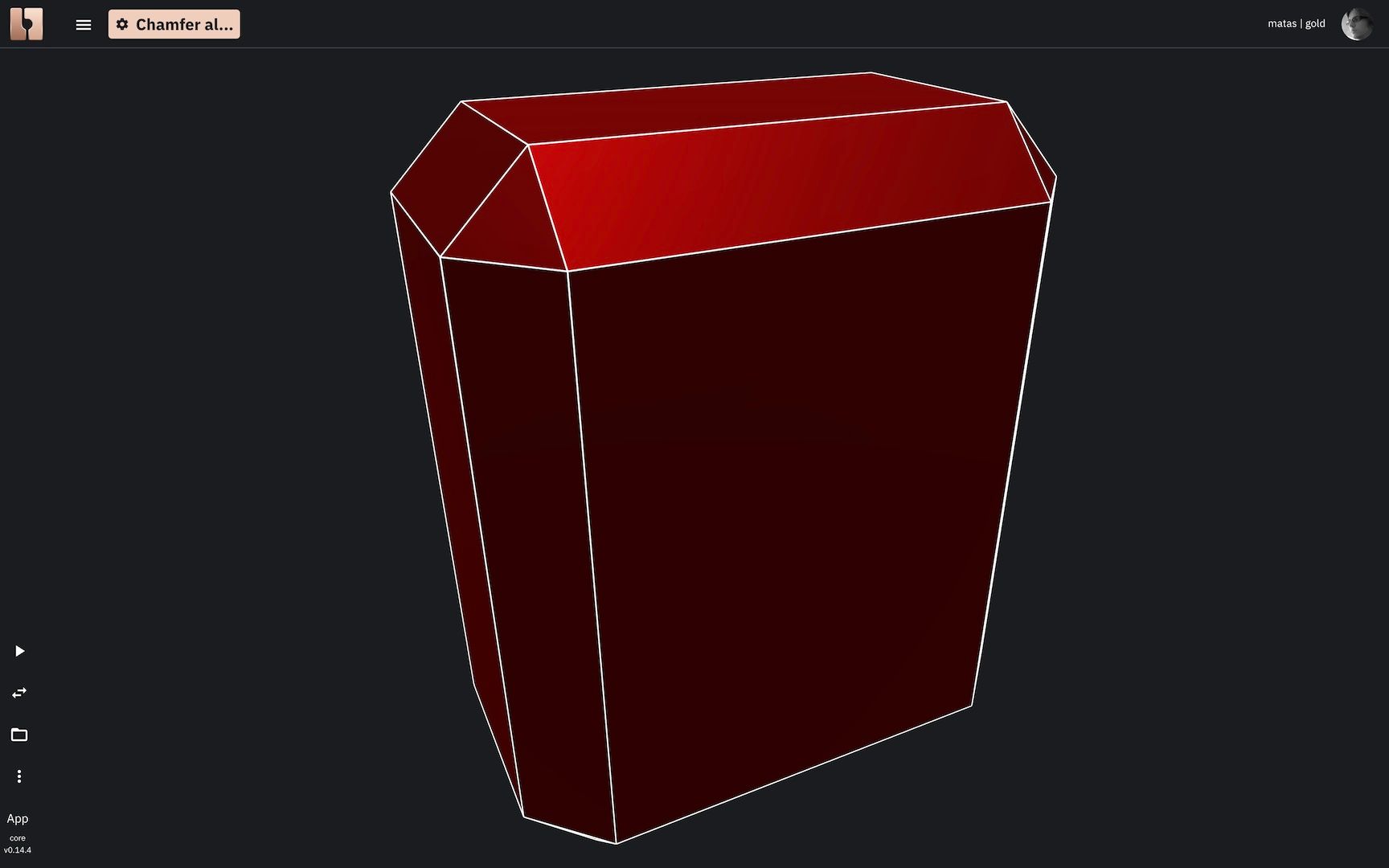 Chamfer on a 3D solid.
How Can Chamfers Be Applied to a Solid or Shell?
The application of chamfers is very similar to that of fillets:
- Chamfer All Edges: You can apply a chamfer of a uniform distance (or distances) to all eligible edges of a solid or shell simultaneously.
- Chamfer Specific Edges by Index: For more precise control, you can apply chamfers to specific edges by providing their edge indexes. This allows for different chamfer sizes on different edges or chamfering only a subset of edges. (This more advanced topic might be covered in a separate section, similar to variable radius fillets).
Chamfering All Edges of a Solid (Uniform Distance)
Let's first look at applying a chamfer with a given distance to all applicable edges of a solid. In Bitbybit, you'll typically use a "Chamfer Edges" command or function for this. The "distance" usually refers to how far along each adjacent face the new chamfer face extends from the original edge. Sometimes, two distances can be specified if an asymmetrical chamfer is desired.
The following examples in TypeScript, Rete, and Blockly demonstrate creating a simple box solid and then chamfering all its edges:
TypeScript Example: Chamfer All Edges of a Solid


const start = async () => {

    const boxOpt = new Bit.Inputs.OCCT.BoxDto();
    boxOpt.width = 5;
    boxOpt.length = 8;
    boxOpt.height = 10;
    const box = await bitbybit.occt.shapes.solid.createBox(boxOpt);

    const chamfered = await bitbybit.occt.fillets.chamferEdges({
        shape: box,
        distance: 1,
    })

    bitbybit.draw.drawAnyAsync({
        entity: chamfered,
    });
}

start();
Blockly Example: Chamfer All Edges of a Solid

<xml xmlns="https://developers.google.com/blockly/xml"><block type="bitbybit.draw.drawAnyAsyncNoReturn" id="pF!Mww.[{,{0LvKi|wH}" x="-473" y="-1277"><value name="Entity"><block type="bitbybit.occt.fillets.chamferEdges" id="76A-4pZ@I:Hre1*8I/vU"><value name="Shape"><block type="bitbybit.occt.shapes.solid.createBox" id="mQ8NHOuARgLyhBk6}g^s"><value name="Width"><block type="math_number" id="7fG@;W/:Vts$zSO}4j(]"><field name="NUM">5</field></block></value><value name="Length"><block type="math_number" id="LCj)(O6k1)^yPkJEoMzD"><field name="NUM">8</field></block></value><value name="Height"><block type="math_number" id="?-!Ip3I^G@=fxbcl4Iu|"><field name="NUM">10</field></block></value><value name="Center"><block type="bitbybit.point.pointXYZ" id="}!.!!0$]TL43CwavkTh*"><value name="X"><block type="math_number" id="z5z_A~D,9e0jpC)1{_g:"><field name="NUM">0</field></block></value><value name="Y"><block type="math_number" id="5=3R#MG7#!Q8TG1[{=P`"><field name="NUM">0</field></block></value><value name="Z"><block type="math_number" id="y*}sZo/[)Qb/ZUE?u!ep"><field name="NUM">0</field></block></value></block></value></block></value><value name="Distance"><block type="math_number" id="a7qb/Osu:a!%Jv23@FkJ"><field name="NUM">1</field></block></value></block></value></block></xml>
Rete Example: Chamfer All Edges of a Solid

{
  "id": "rete-v2-json",
  "nodes": {
    "24d5eba8a6441cd3": {
      "id": "24d5eba8a6441cd3",
      "name": "bitbybit.occt.shapes.solid.createBox",
      "customName": "box",
      "async": true,
      "drawable": true,
      "data": {
        "genericNodeData": {
          "hide": true,
          "oneOnOne": false,
          "flatten": 0,
          "forceExecution": false
        },
        "width": 5,
        "length": 8,
        "height": 10,
        "center": [
          0,
          0,
          0
        ],
        "originOnCenter": true
      },
      "inputs": {},
      "position": [
        -275.18114701728985,
        930.0233810957773
      ]
    },
    "30cbe001c6a96c1b": {
      "id": "30cbe001c6a96c1b",
      "name": "bitbybit.occt.fillets.chamferEdges",
      "customName": "chamfer edges",
      "async": true,
      "drawable": true,
      "data": {
        "genericNodeData": {
          "hide": false,
          "oneOnOne": false,
          "flatten": 0,
          "forceExecution": false
        },
        "distance": 1
      },
      "inputs": {
        "shape": {
          "connections": [
            {
              "node": "24d5eba8a6441cd3",
              "output": "result",
              "data": {}
            }
          ]
        }
      },
      "position": [
        166.56224243004735,
        923.8486040847145
      ]
    }
  }
}
Chamfering is another essential tool in the CAD modeler's toolkit, providing a distinct way to treat edges compared to fillets, and is widely used in mechanical design and manufacturing.