Materials and the look of a model
A shape has no colour: the look belongs to the drawing. Three things decide it.
Colours and edges
The drawing options set a face colour, an edge colour and width, opacity, and whether to draw edges, faces and vertices at all: bitbybit.draw.optionsOcctShape for OpenCascade shapes, and options of their own for Manifold and JSCAD shapes, points and lines. Draw examples shows them. Colours are hex text such as #d4a85a, or numbers from 0 to 1, never 0 to 255; Conventions says why.
Materials
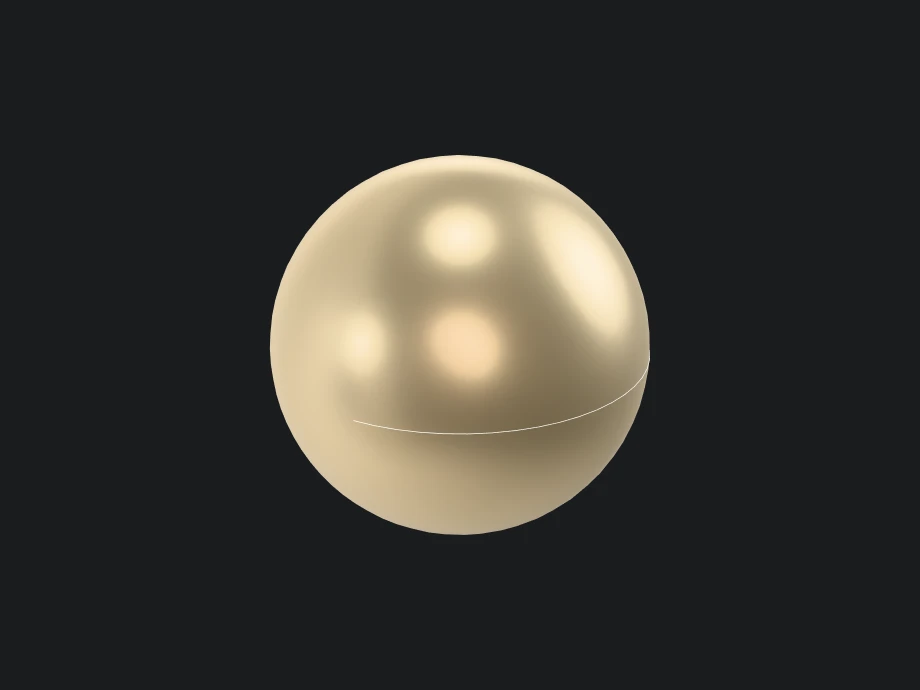
For a model that should look made of something, give its faces a physically based material (PBR): bitbybit.draw.createPBRMaterial describes a surface by its base colour, how metallic it is from 0 to 1, and how rough from 0 for a mirror to 1 for chalk. Pass it as the face material in bitbybit.draw.optionsOcctShapeMaterial:
- Rete
- Blockly
- TypeScript

{
  "id": "rete-v2-json",
  "nodes": {
    "sphere": {
      "id": "sphere",
      "name": "bitbybit.occt.shapes.solid.createSphere",
      "customName": "sphere",
      "async": true,
      "drawable": true,
      "data": {
        "genericNodeData": {
          "hide": true,
          "oneOnOne": false,
          "flatten": 0,
          "forceExecution": false
        },
        "radius": 3,
        "center": [
          0,
          0,
          0
        ]
      },
      "inputs": {},
      "position": [
        40,
        40
      ]
    },
    "metal": {
      "id": "metal",
      "name": "bitbybit.draw.createPBRMaterial",
      "customName": "create pbr material",
      "async": false,
      "drawable": false,
      "data": {
        "genericNodeData": {
          "hide": false,
          "oneOnOne": false,
          "flatten": 0,
          "forceExecution": false
        },
        "name": "PBRMaterial",
        "baseColor": "#e8c27a",
        "metallic": 0.8,
        "roughness": 0.35,
        "alpha": 1,
        "emissiveColor": "#000000",
        "emissiveIntensity": 1,
        "zOffset": 0,
        "zOffsetUnits": 0,
        "alphaMode": "opaque",
        "alphaCutoff": 0.5,
        "doubleSided": false,
        "wireframe": false,
        "unlit": false
      },
      "inputs": {},
      "position": [
        40,
        360
      ]
    },
    "options": {
      "id": "options",
      "name": "bitbybit.draw.optionsOcctShapeMaterial",
      "customName": "options occt shape material",
      "async": false,
      "drawable": false,
      "data": {
        "genericNodeData": {
          "hide": false,
          "oneOnOne": false,
          "flatten": 0,
          "forceExecution": false
        },
        "precision": 0.01,
        "drawEdges": true,
        "edgeColour": "#ffffff",
        "edgeWidth": 2
      },
      "inputs": {
        "faceMaterial": {
          "connections": [
            {
              "node": "metal",
              "output": "result",
              "data": {}
            }
          ]
        }
      },
      "position": [
        460,
        360
      ]
    },
    "draw": {
      "id": "draw",
      "name": "bitbybit.draw.drawAnyAsync",
      "customName": "draw any async",
      "async": true,
      "drawable": true,
      "data": {
        "genericNodeData": {
          "hide": false,
          "oneOnOne": false,
          "flatten": 0,
          "forceExecution": false
        }
      },
      "inputs": {
        "entity": {
          "connections": [
            {
              "node": "sphere",
              "output": "result",
              "data": {}
            }
          ]
        },
        "options": {
          "connections": [
            {
              "node": "options",
              "output": "result",
              "data": {}
            }
          ]
        }
      },
      "position": [
        880,
        40
      ]
    }
  },
  "modules": {}
}

<xml xmlns="https://developers.google.com/blockly/xml"><block type="bitbybit.draw.drawAnyAsyncNoReturn" x="40" y="40"><value name="Entity"><block type="bitbybit.occt.shapes.solid.createSphere"><value name="Radius"><block type="math_number"><field name="NUM">3</field></block></value><value name="Center"><block type="bitbybit.point.pointXYZ"><value name="X"><block type="math_number"><field name="NUM">0</field></block></value><value name="Y"><block type="math_number"><field name="NUM">0</field></block></value><value name="Z"><block type="math_number"><field name="NUM">0</field></block></value></block></value></block></value><value name="Options"><block type="bitbybit.draw.optionsOcctShapeMaterial"><value name="Precision"><block type="math_number"><field name="NUM">0.01</field></block></value><value name="FaceMaterial"><block type="bitbybit.draw.createPBRMaterial"><value name="Name"><block type="text"><field name="TEXT">PBRMaterial</field></block></value><value name="BaseColor"><block type="colour_picker"><field name="COLOUR">#e8c27a</field></block></value><value name="Metallic"><block type="math_number"><field name="NUM">0.8</field></block></value><value name="Roughness"><block type="math_number"><field name="NUM">0.35</field></block></value><value name="Alpha"><block type="math_number"><field name="NUM">1</field></block></value><value name="EmissiveColor"><block type="colour_picker"><field name="COLOUR">#000000</field></block></value><value name="EmissiveIntensity"><block type="math_number"><field name="NUM">1</field></block></value><value name="ZOffset"><block type="math_number"><field name="NUM">0</field></block></value><value name="ZOffsetUnits"><block type="math_number"><field name="NUM">0</field></block></value><value name="AlphaMode"><block type="bitbybit.draw.enums.alphaModeEnum"><field name="bitbybit.draw.enums.alphaModeEnum">'opaque'</field></block></value><value name="AlphaCutoff"><block type="math_number"><field name="NUM">0.5</field></block></value><value name="DoubleSided"><block type="logic_boolean"><field name="BOOL">FALSE</field></block></value><value name="Wireframe"><block type="logic_boolean"><field name="BOOL">FALSE</field></block></value><value name="Unlit"><block type="logic_boolean"><field name="BOOL">FALSE</field></block></value></block></value><value name="DrawEdges"><block type="logic_boolean"><field name="BOOL">TRUE</field></block></value><value name="EdgeColour"><block type="colour_picker"><field name="COLOUR">#ffffff</field></block></value><value name="EdgeWidth"><block type="math_number"><field name="NUM">2</field></block></value></block></value></block></xml>

const sphere = await bitbybit.occt.shapes.solid.createSphere({ radius: 3, center: [0, 0, 0] });
const metal = bitbybit.draw.createPBRMaterial({ baseColor: "#e8c27a", metallic: 0.8, roughness: 0.35 });

const options = new Bit.Inputs.Draw.DrawOcctShapeMaterialOptions();
options.faceMaterial = metal;
await bitbybit.draw.drawAnyAsync({ entity: sphere, options });
Metal looks like metal only when it has something to reflect, so a PBR material shines once the scene has an environment. A material can also take textures, transparency and a glow of its own.
In the coding editors, what a script draws without options of its own takes its look from the editor's rendering settings (Editor settings): by default white faces with a slight sheen, grey edges, white wires and a hidden studio environment, or the older red metallic look for those who prefer it. Options a script passes replace those settings for what they draw, all but metallic and roughness, so a script that gives a part its own color also sets the edges and back faces it wants. A material such as steel goes in as faceMaterial of bitbybit.draw.optionsOcctShape, which keeps the other drawing options. With the BabylonJS npm package, defaults like these can be set on the context, as drawDefaults; nothing is set there unless you set it.
Lights and the scene
The rest of the look is the scene: its background, its lights and their shadows, and the environment that metals reflect. In the coding editors these are bitbybit.babylon.scene functions, such as drawDirectionalLight for a sun that casts shadows; with the npm packages you set them up in the engine you use.