ANNOUNCING PlayCanvas Support: High-Performance 3D CAD for Game Developers

We are excited to announce the release of our new open-source NPM package and runner for PlayCanvas, one of the most performant and feature-rich WebGL game engines available. The @bitbybit-dev/playcanvas package and PlayCanvas Runner continue our mission to make professional 3D CAD accessible across the entire web development ecosystem, now empowering PlayCanvas developers with industrial-grade geometric modeling capabilities.
Explore the New Package:
- NPM: @bitbybit-dev/playcanvas
- NPM (Core Layer): @bitbybit-dev/core
- GitHub: Bitbybit.dev Monorepo
- Documentation: PlayCanvas Integration Guide
Short demo of some of the Bitbybit projects rendered via PlayCanvas:
Why PlayCanvas?
PlayCanvas has established itself as a leading choice for web-based game development and interactive 3D experiences. Its entity-component architecture, visual editor, and exceptional runtime performance make it ideal for creating everything from games to product configurators. However, when it comes to precise CAD operations, parametric modeling, and industrial-grade geometry processing, developers have traditionally needed to look elsewhere.
With Bitbybit's PlayCanvas integration, that changes. Now, PlayCanvas developers can leverage:
- Industrial CAD Kernels: Access to OpenCascade (OCCT), JSCAD, and Manifold geometry engines
- Parametric Modeling: Create complex, constraint-based 3D models that update dynamically
- Boolean Operations: Precise union, intersection, and difference operations on solid geometry
- Advanced Surfaces: Lofting, sweeping, filleting, and chamfering operations
- CAD File I/O: Import and export STEP, IGES, STL, and other industry-standard formats
All of this power is now available within PlayCanvas's entity-component system, maintaining the engine's clean architecture and high performance.
The PlayCanvas Runner: Instant CAD Anywhere
Just like our ThreeJS and BabylonJS runners, we're releasing a PlayCanvas Runner that allows you to execute Bitbybit CAD scripts on any website using a single JavaScript file from our CDN. This means you can:
- Create 3D product configurators for e-commerce sites
- Build interactive parametric design tools
- Embed CAD modeling capabilities in documentation or tutorials
- Prototype complex geometries without complex build setups
The PlayCanvas Runner follows the same architecture as our other runners, supporting both full and lite versions:
bitbybit-runner-playcanvas.js:- Includes everything needed to run Bitbybit scripts, including the PlayCanvas engine itself
- Perfect for quick integration when PlayCanvas isn't already part of your project
- Bundles CAD kernels, web workers, and all dependencies
bitbybit-runner-lite-playcanvas.js:- Lightweight version that expects PlayCanvas to be loaded separately
- Ideal for projects already using PlayCanvas
- Significantly smaller bundle size
- Expects
pc(PlayCanvas) to be available aswindow.PLAYCANVAS
How to Include the PlayCanvas Runner
The runners are served from the Bitbybit CDN. Include them in your website with these script tags (replace <version-number-of-bitbybit> with the actual version):
For production applications, consider self-hosting the runners and assets for improved reliability and performance.
- PlayCanvas Runner (Full):
<script src="https://git-cdn.bitbybit.dev/v<version-number-of-bitbybit>/runner/bitbybit-runner-playcanvas.js"></script>
- PlayCanvas Runner (Lite):
<script src="https://git-cdn.bitbybit.dev/v<version-number-of-bitbybit>/runner/bitbybit-runner-lite-playcanvas.js"></script>
You can find all official Bitbybit versions on GitHub Releases.
Using the PlayCanvas Runner
Once included, the runner is accessible via window.bitbybitRunner:
// Get the runner instance
const runner = window.bitbybitRunner.getRunnerInstance();

// Initialize the runner with your canvas
const { bitbybit, Bit, camera, scene, app, pc } = await runner.run({
    canvasId: 'playcanvas-canvas',
    canvasZoneClass: 'myCanvasZone',
    // Configure which kernels to enable
    enableOCCT: true,
    enableJSCAD: true,
    enableManifold: true,
    // Optional scene configuration
    cameraPosition: [20, 10, 20],
    cameraTarget: [0, 0, 0],
    backgroundColor: '#1a1c1f',
});

// Now you can use bitbybit directly for CAD operations
const cube = await bitbybit.occt.shapes.solid.createCube({ size: 10, center: [0, 0, 0] });
await bitbybit.draw.drawAnyAsync({ entity: cube });

// Or execute an exported script with inputs
const results = await runner.executeScript(
    yourExportedScript,
    {
        // Pass inputs to your script
        width: 10,
        height: 5,
        depth: 3
    }
);

// Access outputs from your script
console.log(results);
Exporting Scripts for the PlayCanvas Runner
All Bitbybit visual programming editors (Rete, Blockly, TypeScript) support exporting scripts compatible with the PlayCanvas Runner. The export process is identical to other engines:
- Open your script in any Bitbybit editor
- Click the "More Actions" menu
- Select "Export to Runner"
- Choose "PlayCanvas" as your target engine
- Copy or download the generated JavaScript code
Your exported script can then be executed by the PlayCanvas Runner on any website, in any coding environment (StackBlitz, CodePen, JSFiddle), or embedded in your own applications.
Comparing Runners: BabylonJS, ThreeJS, and PlayCanvas
All three runner families share the same core CAD capabilities:
- Full access to OCCT, JSCAD, and Manifold kernels
- Identical parametric modeling operations
- Same file import/export capabilities
- Compatible with visual scripts from Bitbybit editors (with some engine-specific considerations)
The primary differences relate to the game engines themselves:
BabylonJS Runner:
- Best compatibility with visual scripts from Bitbybit.dev editors (natively BabylonJS-based)
- Includes physics (Havok), GUI elements, and advanced materials out of the box
- Largest bundle size
- Ideal for projects requiring BabylonJS-specific features
ThreeJS Runner:
- Vast ecosystem and community
- Smaller bundle size than BabylonJS
- Excellent for projects already using ThreeJS
- Good compatibility with visual scripts (unless they use BabylonJS-specific features)
PlayCanvas Runner:
- Exceptional performance and mobile optimization
- Entity-component architecture familiar to game developers
- Cloud-based visual editor available
- Professional game development features
- Excellent for real-time applications and games requiring CAD precision
Architecture: Engine-Agnostic Core
Our PlayCanvas integration maintains the same modular, engine-agnostic architecture we established with ThreeJS and BabylonJS support:
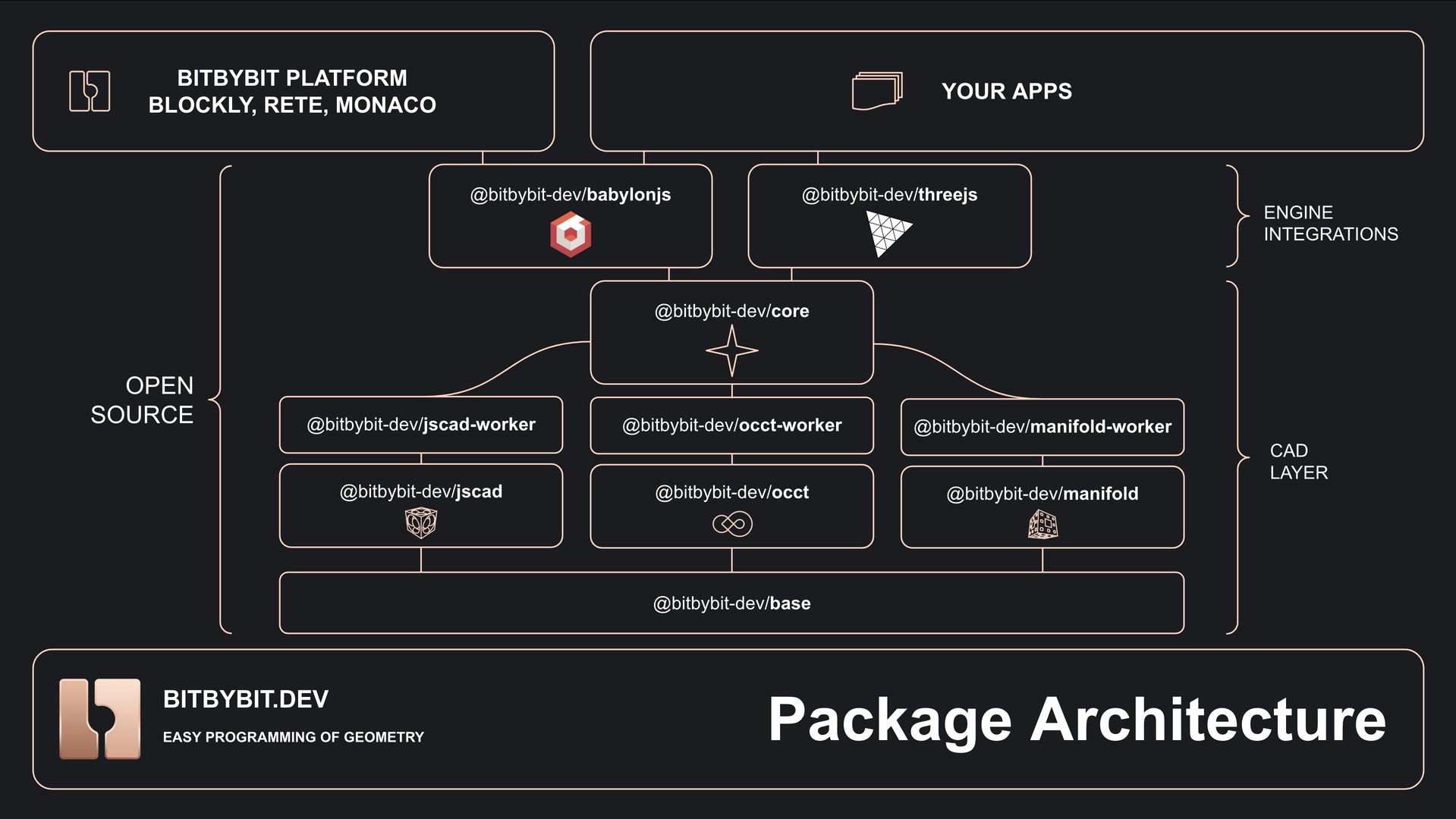
The @bitbybit-dev/core package contains all fundamental CAD logic, data structures, and interfaces. Each game engine-specific package (@bitbybit-dev/playcanvas, @bitbybit-dev/threejs, @bitbybit-dev/babylonjs) provides a thin integration layer that translates between Bitbybit's CAD operations and the respective engine's rendering system.
This architecture means:
- Consistent API: Learn once, use everywhere
- Easy Migration: Switch engines if project requirements change
- Future-Proof: New engine integrations can be added without disrupting existing code
- Optimal Performance: Each integration is specifically optimized for its target engine
Real-World Use Cases with PlayCanvas
PlayCanvas's performance characteristics make it particularly well-suited for certain applications:
3D Product Configurators: PlayCanvas's mobile-first optimization is perfect for e-commerce product configurators that need to run smoothly on smartphones and tablets. Combined with Bitbybit's parametric modeling, you can create configurators for furniture, jewelry, mechanical parts, and more.
Architectural Visualizations: Create interactive architectural presentations with parametric building components. Users can adjust dimensions, materials, and layouts in real-time while maintaining structural precision.
Engineering Applications: Build web-based CAD tools for mechanical engineering, allowing engineers to design, test, and share components directly in the browser without specialized software.
Educational Tools: Develop interactive geometry and mathematics education tools that demonstrate CAD concepts with high performance even on limited hardware.
Game Integration: Generate procedural game assets with CAD precision, create customizable in-game items, or build level editors that use industrial-grade geometry operations.
Getting Started
To start using Bitbybit with PlayCanvas:
-
Via NPM (for build-based projects):
npm install @bitbybit-dev/playcanvasThen follow our PlayCanvas Integration Guide
-
Via Runner (for quick integration): Include the runner script tag and start executing your CAD scripts immediately. Check our Runner documentation and examples on GitHub
-
Visual Programming: Create your geometry in Bitbybit's visual editors, export to the PlayCanvas Runner, and integrate with your own UI
Examples and Resources
We've prepared comprehensive documentation and examples:
- PlayCanvas Starter Template: Complete setup guide with Vite
- Advanced Parametric Model: Complex parametric modeling with GUI
- Hex House Concept: Architectural parametric design showcase
- GitHub Examples: Working code samples
PlayCanvas is Here to Stay
Just like BabylonJS and ThreeJS, PlayCanvas is now a first-class citizen in the Bitbybit ecosystem. We're committed to maintaining and improving this integration, ensuring PlayCanvas developers have access to the same powerful CAD capabilities available on other platforms.
This expansion continues our vision of making professional 3D CAD truly accessible and adaptable for the entire web development community. Whether you're a game developer, product designer, engineer, or educator, you now have more choices than ever for bringing precise, parametric 3D modeling to your web projects.
What's Next?
We're actively working on:
- More PlayCanvas-specific examples and tutorials
- Additional integration with PlayCanvas's visual editor
- Enhanced support for PlayCanvas-specific features in visual scripts
We're excited to see what the PlayCanvas community will create with these new CAD capabilities. Share your projects with us on Discord, tag us on social media, or contribute examples to our GitHub repository!
Ready to get started?
- 📦 Install @bitbybit-dev/playcanvas
- 📚 Read the Documentation
- 🎮 Try the PlayCanvas Runner
- 💬 Join our Discord Community
Happy coding, and welcome to the PlayCanvas community in Bitbybit! 🎮✨