
Pin with Label
Pin with label is a powerful annotation tool that creates visual markers with text labels to highlight important points, display calculated values, or provide contextual information in your 3D models. These pins consist of a line connecting two points with customizable text labels, making them perfect for technical documentation, design reviews, and educational materials.
Understanding Pin with Label
Pin with label annotations combine geometric positioning with text information to create clear, professional annotations. They're essential for communicating design intent, displaying calculated properties, and marking critical features in your models.
Key components include:
- Start Point: The point where the pin originates (usually on or near your geometry)
- End Point: The point where the pin terminates (typically positioned for optimal label visibility)
- Direction Vector: Controls the orientation of the label text
- Label Text: The information to display (can be static text or dynamic calculated values)
- Label Positioning: Offset and size controls for optimal readability
Simple Pin with Static Label
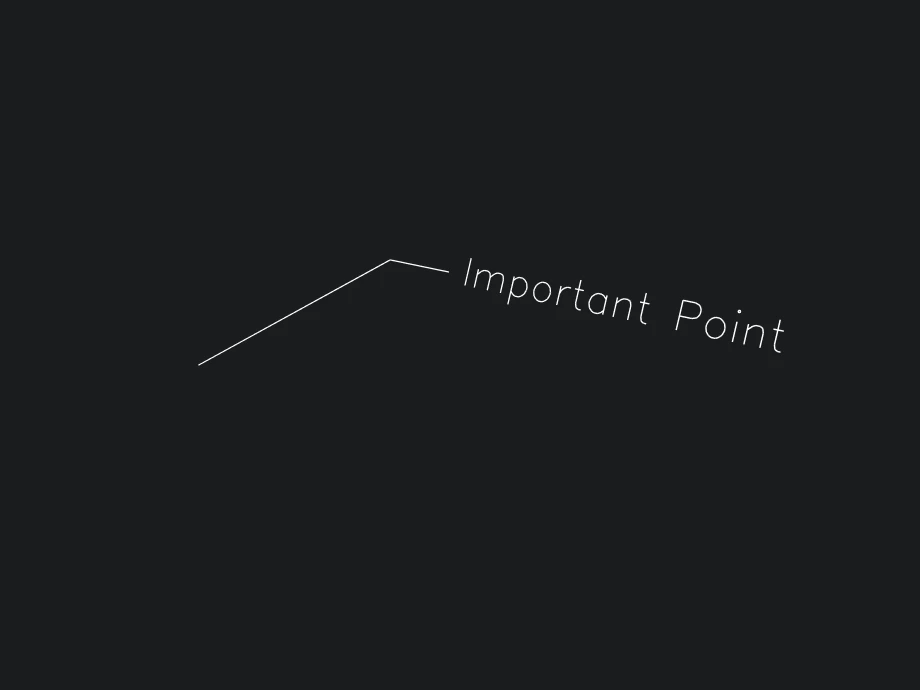
The most basic use case is creating a pin with static text to mark important points in your model.
- Rete
- Blockly
- TypeScript

{
  "id": "rete-v2-json",
  "nodes": {
    "startPoint": {
      "id": "startPoint",
      "name": "bitbybit.point.pointXYZ",
      "customName": "point xyz",
      "async": false,
      "drawable": true,
      "data": {
        "genericNodeData": {
          "hide": true,
          "oneOnOne": false,
          "flatten": 0,
          "forceExecution": false
        },
        "x": 0,
        "y": 0,
        "z": 0
      },
      "inputs": {},
      "position": [
        -3,
        5
      ]
    },
    "endPoint": {
      "id": "endPoint",
      "name": "bitbybit.point.pointXYZ",
      "customName": "point xyz",
      "async": false,
      "drawable": true,
      "data": {
        "genericNodeData": {
          "hide": true,
          "oneOnOne": false,
          "flatten": 0,
          "forceExecution": false
        },
        "x": 3,
        "y": 2,
        "z": 1
      },
      "inputs": {},
      "position": [
        -4,
        357
      ]
    },
    "direction": {
      "id": "direction",
      "name": "bitbybit.vector.vectorXYZ",
      "customName": "vector xyz",
      "async": false,
      "drawable": true,
      "data": {
        "genericNodeData": {
          "hide": true,
          "oneOnOne": false,
          "flatten": 0,
          "forceExecution": false
        },
        "x": 1,
        "y": 0,
        "z": 0
      },
      "inputs": {},
      "position": [
        -8,
        707
      ]
    },
    "pinWithLabel": {
      "id": "pinWithLabel",
      "name": "bitbybit.occt.dimensions.pinWithLabel",
      "customName": "pin with label",
      "async": true,
      "drawable": true,
      "data": {
        "genericNodeData": {
          "hide": false,
          "oneOnOne": false,
          "flatten": 0,
          "forceExecution": false
        },
        "startPoint": [
          0,
          0,
          0
        ],
        "endPoint": [
          0,
          5,
          2
        ],
        "direction": [
          0,
          0,
          1
        ],
        "offsetFromStart": 0,
        "label": "Important Point",
        "labelOffset": 0.3,
        "labelSize": 0.4,
        "endType": "none",
        "arrowSize": 0.3,
        "arrowAngle": 30,
        "arrowsFlipped": false,
        "labelRotation": 0,
        "labelFlipHorizontal": false,
        "labelFlipVertical": false
      },
      "inputs": {
        "startPoint": {
          "connections": [
            {
              "node": "startPoint",
              "output": "result",
              "data": {}
            }
          ]
        },
        "endPoint": {
          "connections": [
            {
              "node": "endPoint",
              "output": "result",
              "data": {}
            }
          ]
        },
        "direction": {
          "connections": [
            {
              "node": "direction",
              "output": "result",
              "data": {}
            }
          ]
        }
      },
      "position": [
        568,
        313
      ]
    }
  },
  "modules": {}
}

<xml xmlns="https://developers.google.com/blockly/xml"><block type="bitbybit.draw.drawAnyAsyncNoReturn" x="-173" y="-13"><value name="Entity"><block type="bitbybit.occt.dimensions.pinWithLabel"><value name="StartPoint"><block type="bitbybit.point.pointXYZ"><value name="X"><block type="math_number"><field name="NUM">0</field></block></value><value name="Y"><block type="math_number"><field name="NUM">0</field></block></value><value name="Z"><block type="math_number"><field name="NUM">0</field></block></value></block></value><value name="EndPoint"><block type="bitbybit.point.pointXYZ"><value name="X"><block type="math_number"><field name="NUM">3</field></block></value><value name="Y"><block type="math_number"><field name="NUM">2</field></block></value><value name="Z"><block type="math_number"><field name="NUM">1</field></block></value></block></value><value name="Direction"><block type="bitbybit.vector.vectorXYZ"><value name="X"><block type="math_number"><field name="NUM">1</field></block></value><value name="Y"><block type="math_number"><field name="NUM">0</field></block></value><value name="Z"><block type="math_number"><field name="NUM">0</field></block></value></block></value><value name="OffsetFromStart"><block type="math_number"><field name="NUM">0</field></block></value><value name="Label"><block type="text"><field name="TEXT">Important Point</field></block></value><value name="LabelOffset"><block type="math_number"><field name="NUM">0.3</field></block></value><value name="LabelSize"><block type="math_number"><field name="NUM">0.4</field></block></value></block></value></block></xml>

// Import the required DTO for pin with label
const { PinWithLabelDto } = Bit.Inputs.OCCT;
type Point3 = Bit.Inputs.Base.Point3;
type Vector3 = Bit.Inputs.Base.Vector3;

// Define points for the pin
const startPoint: Point3 = [0, 0, 0];
const endPoint: Point3 = [3, 2, 1];
const direction: Vector3 = [1, 0, 0];

// Create pin with label options
const pinOptions = new PinWithLabelDto();
pinOptions.startPoint = startPoint;
pinOptions.endPoint = endPoint;
pinOptions.direction = direction;
pinOptions.offsetFromStart = 0;
pinOptions.label = "Important Point";
pinOptions.labelOffset = 0.3;
pinOptions.labelSize = 0.4;

// Create and draw the pin
const pin = await bitbybit.occt.dimensions.pinWithLabel(pinOptions);
bitbybit.draw.drawAnyAsync({ entity: pin });
This basic example demonstrates the essential components of a pin with label:
- Start Point at origin
[0, 0, 0]- where the pin begins - End Point at
[3, 2, 1]- where the pin terminates and the label appears - Direction Vector
[1, 0, 0]- controls label text orientation (pointing along X-axis) - Static Label text "Important Point" - simple text annotation
- Label positioning with 0.3 offset and 0.4 size for good readability
Pin with Calculated Properties
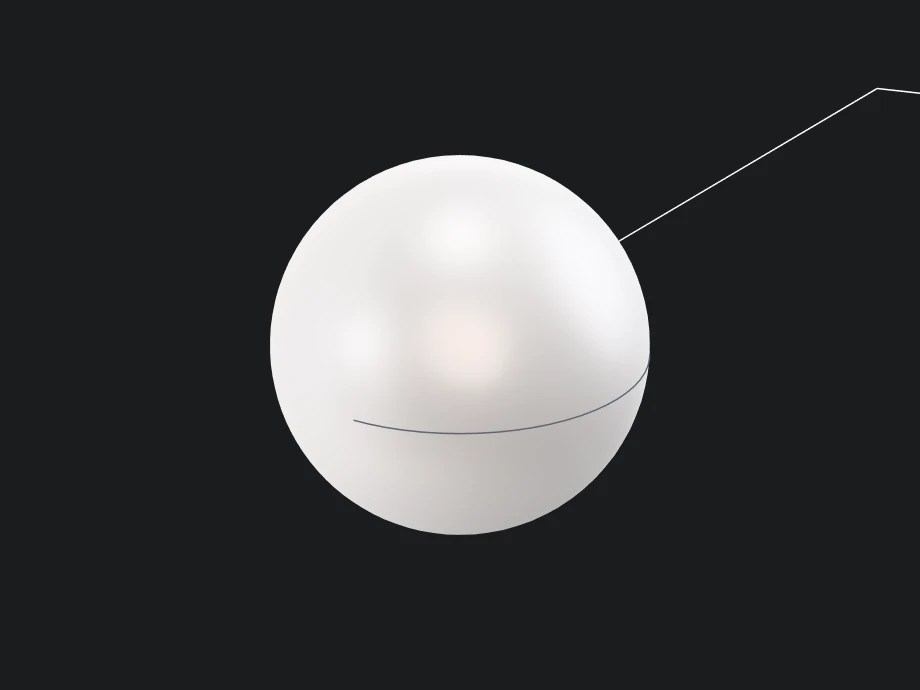
A more practical application combines pin labels with calculated geometric properties, similar to how technical drawings display measurements and specifications.
- Rete
- Blockly
- TypeScript
{
  "id": "rete-v2-json",
  "nodes": {
    "radius": {
      "id": "radius",
      "name": "bitbybit.math.numberSlider",
      "customName": "number slider",
      "async": false,
      "drawable": false,
      "data": {
        "options": {
          "min": 1,
          "max": 5,
          "step": 0.1,
          "width": 300,
          "updateOnDrag": true
        },
        "number": 2.5
      },
      "inputs": {},
      "position": [
        42,
        107
      ]
    },
    "sphere": {
      "id": "sphere",
      "name": "bitbybit.occt.shapes.solid.createSphere",
      "customName": "sphere",
      "async": true,
      "drawable": true,
      "data": {
        "genericNodeData": {
          "hide": false,
          "oneOnOne": false,
          "flatten": 0,
          "forceExecution": false
        },
        "radius": 2.5,
        "center": [
          0,
          0,
          0
        ]
      },
      "inputs": {
        "radius": {
          "connections": [
            {
              "node": "radius",
              "output": "result",
              "data": {}
            }
          ]
        }
      },
      "position": [
        1028,
        63
      ]
    },
    "getVolume": {
      "id": "getVolume",
      "name": "bitbybit.occt.shapes.solid.getSolidVolume",
      "customName": "get solid volume",
      "async": true,
      "drawable": false,
      "data": {
        "genericNodeData": {
          "hide": false,
          "oneOnOne": false,
          "flatten": 0,
          "forceExecution": false
        }
      },
      "inputs": {
        "shape": {
          "connections": [
            {
              "node": "sphere",
              "output": "result",
              "data": {}
            }
          ]
        }
      },
      "position": [
        1424,
        60
      ]
    },
    "roundVolume": {
      "id": "roundVolume",
      "name": "bitbybit.math.roundToDecimals",
      "customName": "round to decimals",
      "async": false,
      "drawable": false,
      "data": {
        "genericNodeData": {
          "hide": false,
          "oneOnOne": false,
          "flatten": 0,
          "forceExecution": false
        },
        "number": 1.123456,
        "decimalPlaces": 2
      },
      "inputs": {
        "number": {
          "connections": [
            {
              "node": "getVolume",
              "output": "result",
              "data": {}
            }
          ]
        }
      },
      "position": [
        1797,
        61
      ]
    },
    "formatVolume": {
      "id": "formatVolume",
      "name": "bitbybit.text.format",
      "customName": "format",
      "async": false,
      "drawable": false,
      "data": {
        "genericNodeData": {
          "hide": false,
          "oneOnOne": false,
          "flatten": 0,
          "forceExecution": false
        },
        "text": "Vol: {0} m3",
        "values": [
          "World"
        ]
      },
      "inputs": {
        "values": {
          "connections": [
            {
              "node": "volumeList",
              "output": "list",
              "data": {}
            }
          ]
        }
      },
      "position": [
        2925,
        20
      ]
    },
    "volumeList": {
      "id": "volumeList",
      "name": "bitbybit.lists.createList",
      "customName": "create list",
      "async": false,
      "drawable": false,
      "data": {},
      "inputs": {
        "listElements": {
          "connections": [
            {
              "node": "volumeToString",
              "output": "result",
              "data": {}
            }
          ]
        }
      },
      "position": [
        2546,
        97
      ]
    },
    "volumeToString": {
      "id": "volumeToString",
      "name": "bitbybit.text.toString",
      "customName": "to string",
      "async": false,
      "drawable": false,
      "data": {
        "genericNodeData": {
          "hide": false,
          "oneOnOne": false,
          "flatten": 0,
          "forceExecution": false
        }
      },
      "inputs": {
        "item": {
          "connections": [
            {
              "node": "roundVolume",
              "output": "result",
              "data": {}
            }
          ]
        }
      },
      "position": [
        2171,
        59
      ]
    },
    "pinStart": {
      "id": "pinStart",
      "name": "bitbybit.point.pointXYZ",
      "customName": "point xyz",
      "async": false,
      "drawable": true,
      "data": {
        "genericNodeData": {
          "hide": true,
          "oneOnOne": false,
          "flatten": 0,
          "forceExecution": false
        },
        "x": 0,
        "y": 0,
        "z": 0
      },
      "inputs": {
        "z": {
          "connections": [
            {
              "node": "radius",
              "output": "result",
              "data": {}
            }
          ]
        }
      },
      "position": [
        1811,
        -1193
      ]
    },
    "pinEnd": {
      "id": "pinEnd",
      "name": "bitbybit.point.pointXYZ",
      "customName": "point xyz",
      "async": false,
      "drawable": true,
      "data": {
        "genericNodeData": {
          "hide": true,
          "oneOnOne": false,
          "flatten": 0,
          "forceExecution": false
        },
        "x": 4,
        "y": 3,
        "z": 0
      },
      "inputs": {
        "z": {
          "connections": [
            {
              "node": "pinHeight",
              "output": "result",
              "data": {}
            }
          ]
        }
      },
      "position": [
        2196,
        -808
      ]
    },
    "pinHeight": {
      "id": "pinHeight",
      "name": "bitbybit.math.add",
      "customName": "add",
      "async": false,
      "drawable": false,
      "data": {
        "genericNodeData": {
          "hide": false,
          "oneOnOne": false,
          "flatten": 0,
          "forceExecution": false
        },
        "first": 1,
        "second": 2
      },
      "inputs": {
        "first": {
          "connections": [
            {
              "node": "radius",
              "output": "result",
              "data": {}
            }
          ]
        }
      },
      "position": [
        1795,
        -731
      ]
    },
    "direction": {
      "id": "direction",
      "name": "bitbybit.vector.vectorXYZ",
      "customName": "vector xyz",
      "async": false,
      "drawable": true,
      "data": {
        "genericNodeData": {
          "hide": true,
          "oneOnOne": false,
          "flatten": 0,
          "forceExecution": false
        },
        "x": 1,
        "y": 0,
        "z": 0
      },
      "inputs": {},
      "position": [
        2198,
        -434
      ]
    },
    "volumePin": {
      "id": "volumePin",
      "name": "bitbybit.occt.dimensions.pinWithLabel",
      "customName": "pin with label",
      "async": true,
      "drawable": true,
      "data": {
        "genericNodeData": {
          "hide": false,
          "oneOnOne": false,
          "flatten": 0,
          "forceExecution": false
        },
        "startPoint": [
          0,
          0,
          0
        ],
        "endPoint": [
          0,
          5,
          2
        ],
        "direction": [
          0,
          0,
          1
        ],
        "offsetFromStart": 0,
        "label": "Volume Pin",
        "labelOffset": 0.3,
        "labelSize": 0.4,
        "endType": "none",
        "arrowSize": 0.3,
        "arrowAngle": 30,
        "arrowsFlipped": false,
        "labelRotation": 0,
        "labelFlipHorizontal": false,
        "labelFlipVertical": false
      },
      "inputs": {
        "startPoint": {
          "connections": [
            {
              "node": "pinStart",
              "output": "result",
              "data": {}
            }
          ]
        },
        "endPoint": {
          "connections": [
            {
              "node": "pinEnd",
              "output": "result",
              "data": {}
            }
          ]
        },
        "direction": {
          "connections": [
            {
              "node": "direction",
              "output": "result",
              "data": {}
            }
          ]
        },
        "label": {
          "connections": [
            {
              "node": "formatVolume",
              "output": "result",
              "data": {}
            }
          ]
        }
      },
      "position": [
        3518,
        -858
      ]
    }
  },
  "modules": {}
}
<xml xmlns="https://developers.google.com/blockly/xml"><variables><variable id="radius">radius</variable><variable id="sphere">sphere</variable><variable id="volume">volume</variable></variables><block type="variables_set" x="-157" y="-286"><field name="VAR" id="radius">radius</field><value name="VALUE"><block type="math_number"><field name="NUM">2.5</field></block></value><next><block type="variables_set"><field name="VAR" id="sphere">sphere</field><value name="VALUE"><block type="bitbybit.occt.shapes.solid.createSphere"><value name="Radius"><block type="variables_get"><field name="VAR" id="radius">radius</field></block></value><value name="Center"><block type="bitbybit.point.pointXYZ"><value name="X"><block type="math_number"><field name="NUM">0</field></block></value><value name="Y"><block type="math_number"><field name="NUM">0</field></block></value><value name="Z"><block type="math_number"><field name="NUM">0</field></block></value></block></value></block></value><next><block type="variables_set"><field name="VAR" id="volume">volume</field><value name="VALUE"><block type="base_time_await_return"><value name="Promise"><block type="bitbybit.occt.shapes.solid.getSolidVolume"><value name="Shape"><block type="variables_get"><field name="VAR" id="sphere">sphere</field></block></value></block></value></block></value><next><block type="bitbybit.draw.drawAnyAsyncNoReturn"><value name="Entity"><block type="bitbybit.occt.dimensions.pinWithLabel"><value name="StartPoint"><block type="bitbybit.point.pointXYZ"><value name="X"><block type="math_number"><field name="NUM">0</field></block></value><value name="Y"><block type="math_number"><field name="NUM">0</field></block></value><value name="Z"><block type="variables_get"><field name="VAR" id="radius">radius</field></block></value></block></value><value name="EndPoint"><block type="bitbybit.point.pointXYZ"><value name="X"><block type="math_number"><field name="NUM">4</field></block></value><value name="Y"><block type="math_number"><field name="NUM">3</field></block></value><value name="Z"><block type="math_arithmetic"><field name="OP">ADD</field><value name="A"><block type="variables_get"><field name="VAR" id="radius">radius</field></block></value><value name="B"><block type="math_number"><field name="NUM">2</field></block></value></block></value></block></value><value name="Direction"><block type="bitbybit.vector.vectorXYZ"><value name="X"><block type="math_number"><field name="NUM">1</field></block></value><value name="Y"><block type="math_number"><field name="NUM">0</field></block></value><value name="Z"><block type="math_number"><field name="NUM">0</field></block></value></block></value><value name="OffsetFromStart"><block type="math_number"><field name="NUM">0</field></block></value><value name="Label"><block type="bitbybit.text.format"><value name="Text"><block type="text"><field name="TEXT">Vol: {0} m3</field></block></value><value name="Values"><block type="lists_create_with"><mutation items="1"></mutation><value name="ADD0"><block type="bitbybit.math.roundToDecimals"><value name="Number"><block type="variables_get"><field name="VAR" id="volume">volume</field></block></value><value name="DecimalPlaces"><block type="math_number"><field name="NUM">2</field></block></value></block></value></block></value></block></value><value name="LabelOffset"><block type="math_number"><field name="NUM">0.3</field></block></value><value name="LabelSize"><block type="math_number"><field name="NUM">0.4</field></block></value></block></value><next><block type="bitbybit.draw.drawAnyAsyncNoReturn"><value name="Entity"><block type="variables_get"><field name="VAR" id="sphere">sphere</field></block></value></block></next></block></next></block></next></block></next></block></xml>
// Import required DTOs and types
const { SphereDto, PinWithLabelDto } = Bit.Inputs.OCCT;
type Point3 = Bit.Inputs.Base.Point3;
type Vector3 = Bit.Inputs.Base.Vector3;

// Get access to OCCT modules
const { solid } = bitbybit.occt.shapes;
const { dimensions } = bitbybit.occt;
const { math, text } = bitbybit;

// Parametric radius value
const radius = 2.5;

// Create a sphere
const sphereOptions = new SphereDto();
sphereOptions.radius = radius;
sphereOptions.center = [0, 0, 0] as Point3;

const sphere = await solid.createSphere(sphereOptions);

// Calculate sphere volume
const volume = await solid.getSolidVolume({ shape: sphere });
const roundedVolume = math.roundToDecimals({ number: volume, decimalPlaces: 2 });

// Format volume as text with units
const volumeText = text.format({
    text: "Vol: {0} m3",
    values: [text.toString({ item: roundedVolume })]
});

// Create pin with calculated volume label
const pinOptions = new PinWithLabelDto();
pinOptions.startPoint = [0, 0, radius] as Point3; // Start at top of sphere
pinOptions.endPoint = [4, 3, radius + 2] as Point3; // Position for visibility
pinOptions.direction = [1, 0, 0] as Vector3;
pinOptions.offsetFromStart = 0;
pinOptions.label = volumeText;
pinOptions.labelOffset = 0.3;
pinOptions.labelSize = 0.4;

// Create and draw the pin
const pin = await dimensions.pinWithLabel(pinOptions);

// Draw both sphere and pin
bitbybit.draw.drawAnyAsync({ entity: sphere });
bitbybit.draw.drawAnyAsync({ entity: pin });
This example demonstrates how to combine pin labels with calculated geometric properties:
- Parametric Sphere: Created with a configurable radius (2.5 units)
- Volume Calculation: Uses
getSolidVolumeto compute the sphere's volume - Dynamic Formatting: Rounds volume to 2 decimal places and formats with units ("Vol: 65.45 m³")
- Smart Positioning: Pin starts at the sphere's top surface and extends to a clear viewing position
- Responsive Layout: Pin height adjusts based on sphere radius for consistent visual presentation
This pattern is commonly used in engineering applications where you need to annotate models with calculated properties that update automatically when geometry parameters change.